It starts with the party scene from Drake’s Burning Bridges music video: a crowded room, chandeliers and a lead performer playing to the camera with a silver cup. AI recreations put a new person in that familiar moment. In Clico, your photo guides the new lead while the reference supplies the performance.
Three parts of one recognizable moment, ready to come together.
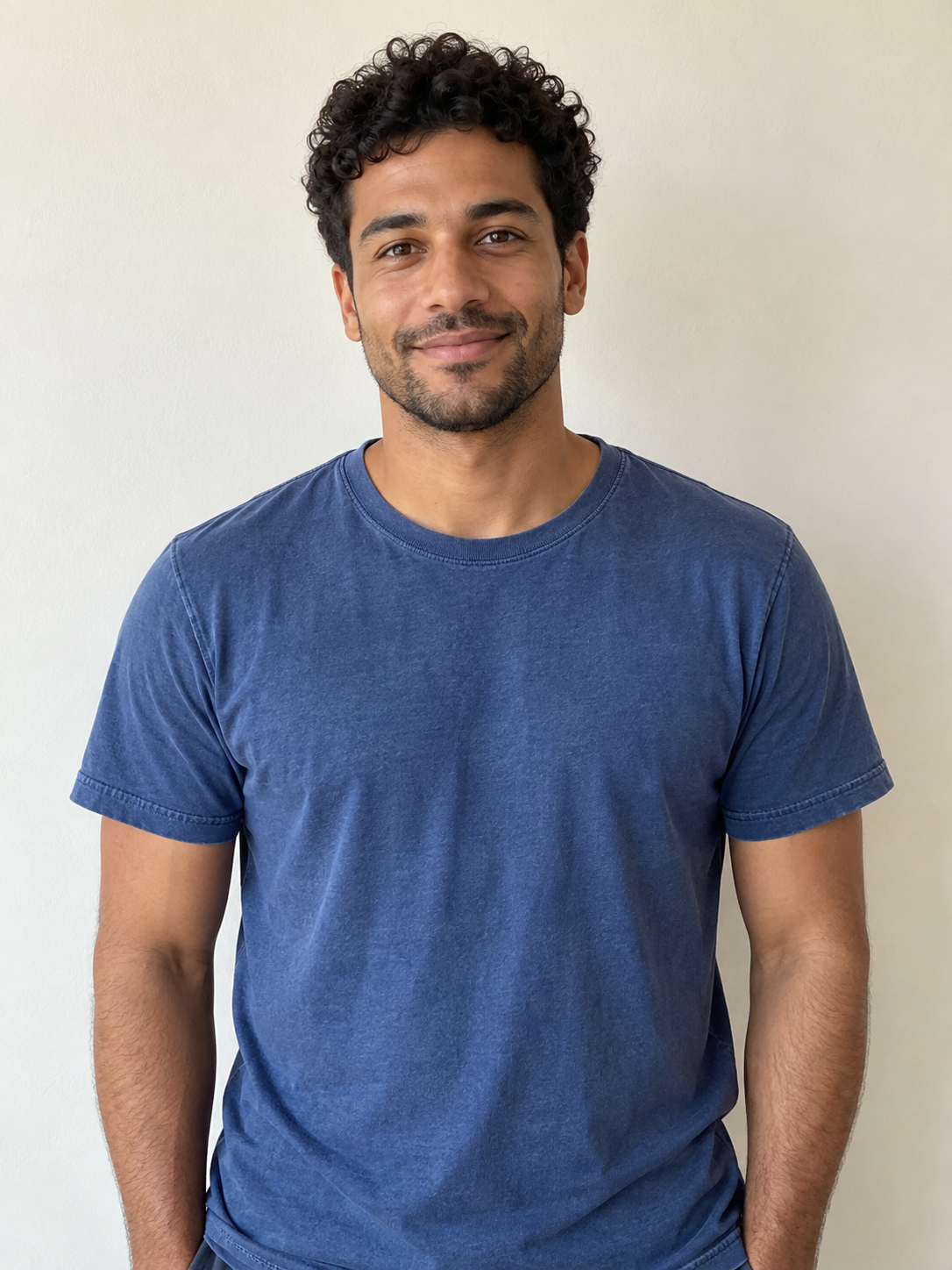
The portrait used in the Clico example above.
Bring your face and outfit.
Your photo supplies the lead’s appearance: face, hair and visible clothes. The curly hair and blue T-shirt in this portrait carry into the example. Choose a photo that includes the look you want to wear.
One person, facing the camera, with the upper body visible.
Even light, clear eyes and an unobstructed face.
A JPG, PNG or WebP up to 8 MB. Upload, drop or paste it.
Preview the reference performance at each length. Every option begins at the same moment, with its matching original soundtrack.
A quick look around the room and a wave. A short reaction to send or share.
The original reference. Your photo supplies the new lead when you create.
Listen to the five-second example.
Leave with the original sound.
The soundtrack travels with the scene. Your finished MP4 includes the reference audio for the length you choose, so the music and party sound are already in the download.
Watch and listen before sharing. AI mouth movement can vary, even when the original recording stays the same.
Give the group chat something to talk about.
A familiar performance becomes a different joke with you in the frame.
Make your entrance
Turn your portrait into the party’s lead for reunion plans, an inside joke or a reply that deserves more than a reaction emoji.
“Me when someone mentions dinner plans.”
Celebrate the small win
A finished deadline. A birthday. Finally booking the trip. Give an ordinary victory an appropriately dramatic celebration.
“After sending that last email.”
Take your character out
Bring an original adult character you created into the scene. Use one clear portrait and let its recognizable hair and outfit carry the idea.
Your photo and a few choices. The performance is ready.
01
Bring your photo
Choose a clear portrait with your face and upper body visible. Use your own photo or one you have permission to transform.
02
Choose your take
Pick 5, 10 or 15 seconds and HD or Standard. Continue to Clico; your photo and choices stay with the draft through sign-in.
03
Watch, then share
Review the credit estimate and generate. Check the face, hands, cup and sound through the full result before downloading your landscape MP4.
Before you join the party.
What is the Burning Bridges AI trend?+
It recasts the lead in the party scene from Drake’s Burning Bridges music video. The crowded room, cup and camera-facing performance make the moment recognizable. Clico uses your photo to guide the new lead’s face, hair and outfit, with the original scene as a video reference.
How do I make a Burning Bridges AI video?+
Upload a clear portrait, choose 5, 10 or 15 seconds and pick HD or Standard. Continue to Clico, sign in and review the credit estimate before creating. The performance is already prepared, so you do not need to write a prompt or upload a video.
Does the downloaded video include the original sound?+
Yes. The finished MP4 uses the original reference soundtrack for your selected length. Play the complete result with sound before sharing; AI mouth movements may not match every word.
What kind of photo should I use?+
Use a sharp, well-lit photo of one person with their face and upper body visible. Include the clothes you want to appear in. Avoid sunglasses, covered faces, heavy filters and group photos. JPG, PNG and WebP files up to 8 MB are supported.
Can I make a Burning Bridges AI video for free?+
You can watch the example and prepare your photo for free. Creating a video requires a paid Clico plan and uses credits. Review the estimate before starting; a new generation uses credits even with the same photo.
What length and format will I get?+
Choose 5, 10 or 15 seconds, starting with 5 seconds by default. Each uses the matching opening segment of the prepared party scene. The MP4 is landscape, 16:9, so the surrounding crowd stays in view. You can ask Clico to reframe the finished result for a vertical post.
Will my photo and settings survive signing in or upgrading?+
Yes. Your photo, length and quality selection carry into Clico as a saved draft. After signing in or returning from billing, reopen the draft to continue. Returning does not start generation automatically.
Will the result look exactly like me?+
Your photo guides the lead’s appearance, while the reference video guides the action. Faces, hands, clothing and movement can vary. Watch the whole result before downloading, especially when a hand or another person crosses the lead’s face.
Can I replace the people in the background too?+
This Clico preset uses one photo for the lead performer. The surrounding guests come from the prepared scene. Use a solo portrait rather than a group photo so the intended person is clear.
Do I need to find the original video or write a prompt?+
No. The Burning Bridges performance and instructions are built into this preset. Add your photo and choose a length and quality. For a different location, action or story, start with Clico’s AI video generator or Image to video instead.
Can I add a caption or make a vertical version?+
After creating, continue in the same Clico conversation and ask for a caption, title or vertical reframe. Review the saved edit before exporting. Keep the lead and cup in view when reframing. Additional generation and editing use Clico credits.
Can I share my video on TikTok or Instagram?+
Download the finished MP4 from Clico. Use your own photo or one you have permission to transform, and check the footage and music rights for your intended use. Follow the platform’s rules for AI content. This is an independent Clico tool, with no artist affiliation or endorsement.