Turn music or speech into a waveform, spectrum or 3D visual. Customize the look, then export MP4 or WebM with your original audio.Free. No watermark. No account.
Your audio, your starting point.Choose an MP3, WAV or another audio file your browser supports.
Every track has a shape.
Or choose your own audio above.
0:00 / 0:00
Your audio stays in this browser. Choose a file or try the sample.
For music, podcasts and brands.
Turn a track, a spoken excerpt or a brand cue into a visual people can watch wherever you share your work.
Promote a music release
Give a single, beat or preview track a visual for YouTube and social feeds. Keep the same palette across a full track upload and shorter release announcements.
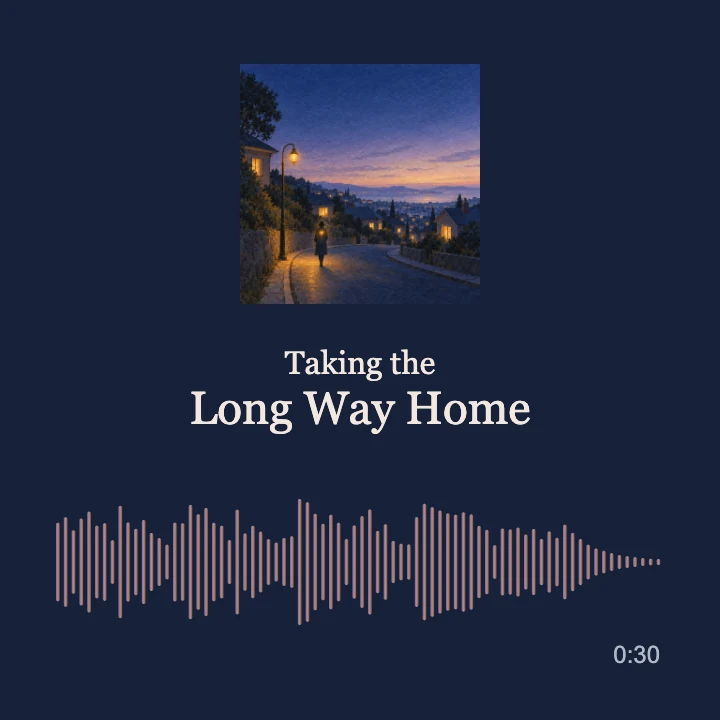
Spectrum from this tool. The cover and song title are added in a separate video edit. Export an MP4 here, then upload it with your cover to Clico to build your own promo.
Share a podcast moment
Turn a chosen voice clip into a portrait video for an episode announcement or a guest highlight. Wave follows the recording while the original voice stays in the export.
Waveform from this tool. The show name and quotation are added in a separate video edit. Upload your exported MP4 to Clico to add your own episode details.
Present a brand soundtrack
Give a campaign cue or jingle a visual for a client review, a product teaser or a social post. Match the palette to the campaign and choose the frame for its destination.
Spectrum from this tool. The studio image and campaign text are added in a separate video edit. Bring your MP4 and brand artwork into Clico for the next step.
Make the visual part of your release.
Carry your cover colors into the waveform, explore movement beyond bars, or export a transparent layer for your edit.
Colors from your cover.
Choose Use cover colors and select your artwork. The tool extracts three colors and applies them to the visualizer, so the movement belongs with your release.
This changes the palette. To include the cover image itself, add it to your exported video in an editor.
From 3D to flowing color.
The same track drives a moving Sphere and flowing Fluid color. Eight styles include waveforms, spectra, Halo and Galaxy, with response and smoothing controls for the movement.
A layer for your edit.
Export a transparent WebM to place the moving waveform over artwork or footage. This comparison uses an exported waveform over the same cover image.
Use an editor that supports WebM transparency. Transparent WebM import into Clico has not been verified; use MP4 for the Clico workflow below.
Create cover artand promo videos.
One release, from its cover and music to a short promo. Download your visualizer as an MP4, then upload it to Clico with the artwork you want to use.
Create your cover art
Generate artwork for your single, podcast, or mix. Describe the mood, colors, and style, then use the image as your release cover or video thumbnail.
Upload your visualizer MP4 and cover to Clico’s video editor. Ask for a short portrait promo with your release title, review the saved version, then export. The composition shown here combines the same song and cover in a separate edit.
Music and image generation, editing requests and video rendering use Clico credits. View plans and allowances
How to make an audio visualizer.
Choose your audio
Open a local audio file or try the sample. Press Play to preview it. Enable sound when you want to listen.
Find the right movement
Select a style and palette. Adjust response and smoothing, then choose your canvas and resolution.
Export your video
Choose a supported format and select Export video. When rendering finishes, download the file with your original audio included.
Frequently asked questions
Can I use this as a music visualizer or sound wave generator?
Yes. Choose Wave for an animated waveform, Bars or Mirror for an audio spectrum, or Radial for a circular visualizer. Music, podcasts and voice recordings all work. This tool exports moving video rather than a static waveform image.
Is the audio visualizer free?
You can preview and export here without an account, payment or watermark. Creating music, artwork or further video edits in Clico is a separate workflow that uses Clico credits.
Can I use the audio visualizer online without a software download?
Yes. Open an MP3 or WAV in your browser, choose a style, then select Export video. Download the finished MP4 or WebM with your original audio. Available formats depend on your browser.
Can I preview the audio visualizer live?
Yes. Press Play to see the visualizer respond live to your selected audio file. Change styles, colors, response and smoothing while it plays. Microphone input and live audio capture are not supported.
Can I add my cover, titles or subtitles here?
Use cover colors extracts a palette; it does not place the image in the video. This tool exports the visualizer and original audio. To add artwork, titles or subtitles, download an MP4 and continue in a video editor. The music, podcast and brand examples show compositions with those elements added separately.
Is this an AI video generator?
This tool analyzes your audio and draws each frame from its waveform and frequency data. You do not need a prompt, and switching styles updates the preview directly.
Which audio files can I use?
Start with MP3 or WAV. M4A, AAC, OGG and FLAC may also work if your browser can decode them. If a file fails to load, try converting it to MP3 or WAV.
Why does the preview start muted?
You can check the movement without unexpected sound. Select Enable sound to listen. Your original audio is included in the exported video even when the preview is muted.
How long does an export take?
It depends on the track length, visual style, resolution and your device. Supported browsers render offline. Transparent WebM and fallback recording run in real time, so keep this page visible until they finish.
Does my audio leave my device?
The visualizer processes your selected file locally in this browser. It does not upload or save the audio to a Clico account. Keep your original file and download your finished video before leaving the page.
How do I continue editing in Clico?
Download an MP4 from this tool, then attach it in Clico Web with your edit request. Keep the MP4 under 100 MB. Ask Clico to add titles or adjust the timing and sound, review the saved version, then export when you are ready.
Why is a video format unavailable?
The format menu only shows recording formats supported by your browser. If an export fails, try the other format or a lower resolution. Transparent output requires WebM and an editor that can read its alpha channel.