Open Gmail and write a rough draft
Write the email the way you would talk through it. Skip the second guessing. Get the ideas down first.

Make a draft clearer, warmer, or more concise where you write. Highlight your text, ask Clico for a revision, and review it before sending.
Free AI email polisher for your browser. Paste your draft, Clico cleans up tone, grammar, length, and structure in seconds. Works in Gmail, Outlook, Yahoo Mail, and any browser based email tool. No copy and paste. No second ChatGPT tab. No download.
Write the email the way you would talk through it. Skip the second guessing. Get the ideas down first.
Highlight the draft, press the shortcut, and pick Polish. Clico reads what you wrote and rewrites it in place.
Read the polished draft. Edit anything you want. Hit send when it sounds right.
Polishing in Gmail comes down to four moves. Rewrite a highlight with Clico It. Open the side panel for a back and forth. Pull in any open tab as context. Pick a persona that matches the recipient. Each move runs inside the page, none of them touch your draft until you say so.
Highlight the draft, press ⌘ O on Mac or Ctrl O on Windows. Clico It opens at your cursor. Ask for a tighter version, a warmer tone, a shorter close. Clico rewrites the highlight in place. The same shortcut works on any text on the page, not just Gmail. Use it in Notion, LinkedIn, Slack, or any browser text box.
When the polish needs more than one pass, open the chat panel on the edge of your browser. Paste the draft, ask follow up questions, push the tone in a new direction, try another phrasing. The panel stays open as you work, so the polish reads as a conversation instead of a one shot rewrite.
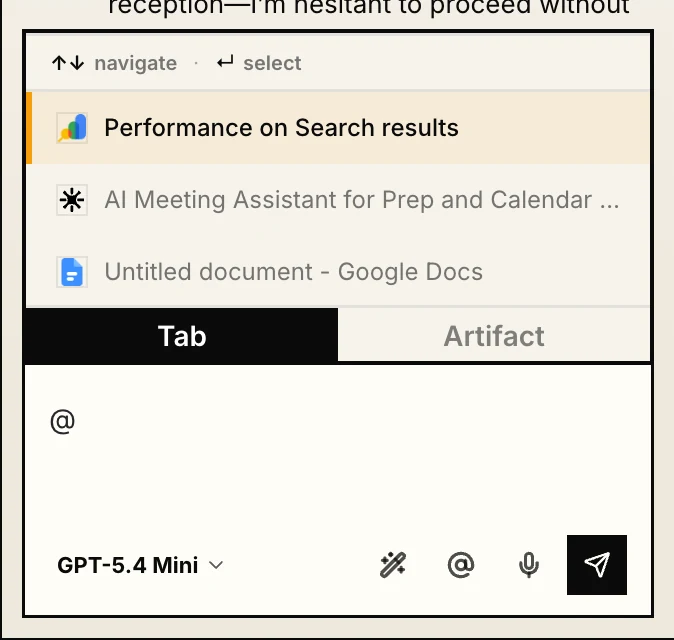
The reply needs the customer brief, the pricing page, or the bug report you already have open in another tab. Type @ in Clico, pick the tab, and the polish reads against that source. Clico summarizes the content into the prompt so you skip the copy and paste step. The reply lands with the actual facts, not a guess based on what you remembered.
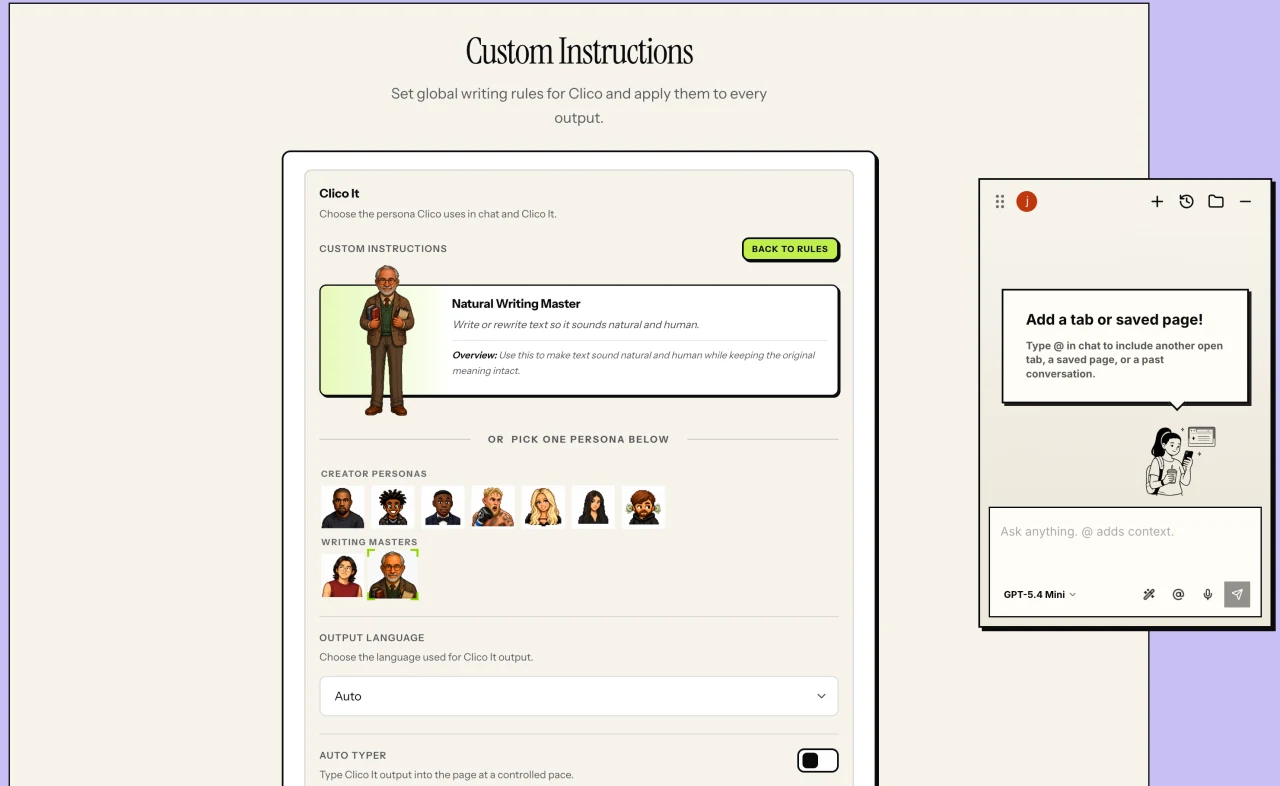
Clico ships with presets for the voices people write in most: calm manager, direct founder, warm CSM, formal exec. Pick one when you start a polish, or train a custom persona on your past emails. The same draft becomes a different polished version for your manager, your customer, or your investor. The voice stays yours.
Polishing an email means taking a rough first draft and shaping it into something professional, clear, and the right length, without changing what you meant. A polished email reads cleanly on the first pass. The tone matches the relationship. The sentences are short enough to scan. The ask is in the right place. Most people polish by hand, reading the draft twice and tweaking each line. Clico runs that pass for you in a couple of seconds. The original meaning stays. Only the rough edges go.
Cut filler, redundant qualifiers, and throat clearing. Each line earns its place.
Adjust formality to the relationship. The same idea reads warmer to a client, crisper to a manager.
Front load the ask. Put context after the action. Put the call to action at the end.
Fix typos, comma errors, and tense shifts you missed in the first pass.
Trim long paragraphs. Expand thin ones. Keep the draft scannable on a phone.
Replace stock signoffs with closings that fit the message and the relationship.
Gmail rolled out a Polish shortcut as part of Workspace AI. The pitch is the same. Highlight a draft, press Polish, get a cleaner version. The reality has been rougher. Users on r/GMail describe the output as gibberish, off topic, or rewritten in a voice that does not sound like them. Clico runs polish through a different prompt chain and keeps you in the loop on what changes, so the result reads like you, only cleaner.
Native shortcut inside Gmail. Free for Workspace accounts. Quality varies, and users report rewrites that drift from the original meaning.
users report rewrites that drift →Chrome extension that runs polish in place inside Gmail. Free plan. Optional Natural Writing Master pass for voice control. Edits stay close to your original draft.
Try Gmail Polish for a quick clean up on a low stakes message. Use Clico when you want the polish to actually sound like the email you wrote.
The most common polish workflow today is the ChatGPT round trip. Copy the draft. Open a tab. Paste it. Type a prompt. Wait. Copy the result. Paste back into Gmail. Fix the spacing. Clico cuts the trip from seven steps to two. Highlight the draft and press the shortcut.
Copy out, open ChatGPT, paste the draft, type a prompt, wait for output, copy back, paste into Gmail, fix line breaks. About 60 seconds per email.
Highlight the draft inside Gmail, press the shortcut, pick Polish. About 2 seconds. Stays in the same tab.
If you write 20 work emails a day, the ChatGPT round trip costs ~20 minutes. Clico polish costs ~40 seconds total. The time gap is what makes people stop using ChatGPT for routine polishing.
Polishing looks different depending on the email. A cold outreach needs a tighter hook. A meeting decline needs a softer landing. Here is what Clico does in each case.
Tighten the opener, lead with one concrete reason, move the ask to the second sentence, cap the message at 80 words.
Lower the temperature, name the issue directly, offer one next step, skip the corporate hedging that reads as dismissive.
Say no early, offer an async alternative, keep the warmth without padding the message with apology.
Acknowledge the impact, take the responsibility, name the fix, avoid the over apologizing that buries the resolution.
Reference the prior thread, offer a fresh hook, keep the tone curious instead of pressuring, cap at three sentences.
Front load the bottom line, group progress by owner, surface blockers in their own line, end with the decision you need.
Polishing is not magic. It is four moves in order. Clico runs each one so you do not have to remember them.
Move the most important sentence to the top. The reader should know your ask before paragraph two.
Take out just, really, very, I think, and I wanted to reach out. The cut reads more sure of itself.
Warm for customers. Direct for your boss. Friendly for coworkers. Same draft. Three different versions.
Drop double sign offs. Pick one closing line that fits the message. End with the next step or your question.
Clico's polish defaults are not aesthetic preferences. They follow public research on how people read, reply to, and respond to email at work.
Boomerang's analysis of 40 million emails found response rates peak between 50 and 125 words and drop sharply beyond 200. Clico aims for that band by default.
Boomerang, 40M email study →Per Harvard Business Review, the military style of bottom line up front lets readers triage in seconds and reply faster.
Harvard Business Review →Grammarly's State of Business Communication report tracks how much time knowledge workers lose to email. Polished emails get answered faster and pull less weight off the reader.
Grammarly State of Business Communication →The Smart Brevity system from Axios distills the same rule. Direct verbs, one idea per paragraph, front load the ask. Clico's polish defaults follow these moves line by line.
Smart Brevity, Axios →Read the sources behind these writing suggestions.
Last verified June 2026.
| Feature | Clico | Gmail Polish | ChatGPT in a tab |
|---|---|---|---|
| Polishes a highlighted draft | Yes, in place | Yes, native | Yes, after copy and paste |
| Runs inside Gmail | Yes | Yes | No |
| Keeps your original voice | Natural Writing Master pass | Often drifts in user reports | Depends on the prompt |
| Uses open tabs as context | @ tab picker | No | Manual paste |
| Time per polish | ~2 seconds | ~3 seconds | ~60 seconds round trip |
| Works in Outlook, Notion, LinkedIn, Slack | Yes | Gmail only | Copy and paste |
| Price | Free includes 200 monthly credits. Pro from $19.90/mo | Workspace plan required | Free and paid tiers |
Clico polishes the draft you actively invoke. It does not read your inbox in the background, send emails on your behalf, or train on your messages.
Polishing means tightening a rough draft into something professional, clear, and the right length, without changing what you meant. It usually covers tone, grammar, length, structure, and the closing. Clico runs all five moves on the highlighted draft in about 2 seconds.
Yes. Install Clico from the Chrome Web Store, highlight any draft inside Gmail, press the shortcut, and pick Polish. Email Polisher is included on Free within the 200 monthly credit allowance. No download, no API key, no credit card.
Gmail's Polish is a native Workspace shortcut that runs a quick AI rewrite. Users on r/GMail have reported that the output sometimes drifts from the original meaning or rewrites the email in a voice that does not sound like them. Clico uses a different prompt chain and an optional Natural Writing Master pass to keep the polish close to your original draft. See the Gmail Polish issue thread on r/GMail
You can. The workflow is copy out, open ChatGPT, paste, prompt, wait, copy back, paste, fix spacing. About 60 seconds per email. Clico shortens that to highlight, press shortcut, pick Polish, about 2 seconds. The polish runs in place inside Gmail.
Front load the ask. Cut filler words. Match tone to the relationship. Tighten the close. Keep the body between 50 and 125 words for the best response rates, per Boomerang's analysis of 40 million emails. Clico runs all four moves on your highlighted draft.
Between 50 and 125 words for the best response rates, according to Boomerang's 40 million email analysis. Past 200 words, response rates drop sharply. Clico's polish defaults aim for that band unless your draft genuinely needs more.
Yes. Clico polishes drafts in Gmail, Outlook on the web, Notion, LinkedIn, Slack, and any browser text box. The way Clico inserts polished text can vary by editor, but the polish itself runs the same way.
No. Clico polishes the highlighted draft and stops. You read the polished version, edit if you want, and hit send yourself. Nothing leaves the page on Clico's side.
Free AI email polisher for Gmail, Outlook, and any browser email. Paste your draft, Clico cleans up tone, grammar, length, and structure in seconds.