Install Clico from the Chrome Web Store
One click install. No download. No setup. No API key. No credit card. Works in Chrome, Edge, Brave, Arc, and any Chromium browser.

Clico is a free auto typer for Chrome. Describe what you need. Clico writes the draft with AI, then types it into Google Docs, Gmail, Notion, LinkedIn, and any browser text box at a normal pace. No download. No copy and paste. No API key.
Clico is a free auto typer for Chrome. Describe what you need. Clico writes the draft with AI, then types it into Google Docs, Gmail, Notion, LinkedIn, and any browser text box at a normal pace. No download. No copy and paste. No API key.
One click install. No download. No setup. No API key. No credit card. Works in Chrome, Edge, Brave, Arc, and any Chromium browser.
Place your cursor in Google Docs, Gmail, Notion, LinkedIn, a CRM ticket, or any browser text field. Press the shortcut to open the Clico prompt.
Type a one line instruction. Clico drafts the text with AI, then types it into the active field at a natural pace. You can pause it or stop it any time.
Edit the text, rewrite it, or stop the typing. Clico does not submit forms, click send, or post anything on your behalf.
Auto Typer covers two writing jobs, not one. Write a fresh draft by giving Clico a one line prompt and watch it type the result into the field. Or highlight a rough paragraph and ask Clico to rewrite it. Either way, the text shows up at your cursor in the active field. Clico works inside Google Docs, Gmail, Notion, LinkedIn, Slack, Twitter, support tools, your CRM, and any other text box you open in the browser.
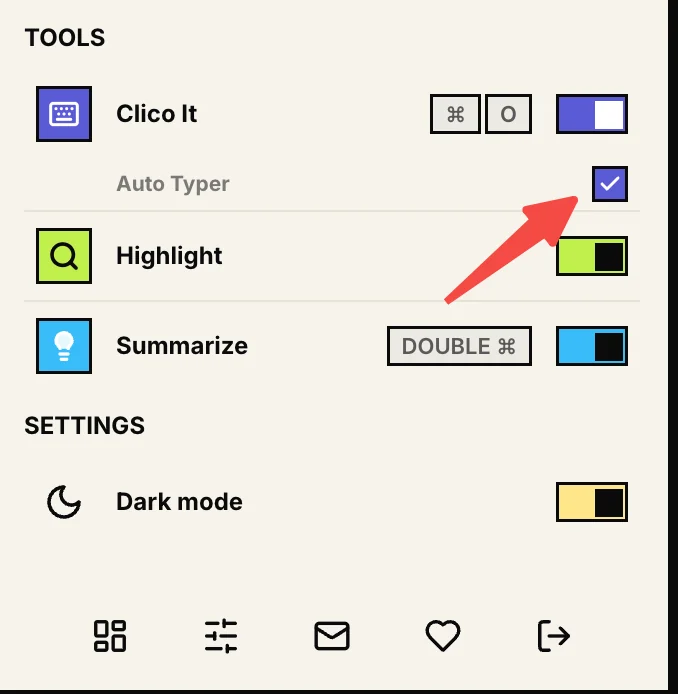
Auto Typer has its own switch inside Clico Settings, sitting under Clico It in the Tools list. Switch it off when you only want to highlight, summarize, or use the regular Clico It action without anything typing into the field. Switch it back on when you want Clico writing at your cursor again. One control. No deep settings. No need to uninstall.
An auto typer puts text into a field so you do not have to press every key. Older tools like Murgee and Autosofted replay text you stored ahead of time. They never write anything new. Clico writes. You give it a one line prompt, it drafts the text with Claude or GPT, then types the result into the field where your cursor sits. Clico is a Chrome extension, so it works inside Google Docs, Gmail, Notion, LinkedIn, Slack, and any text box you open in the browser. No download. No copy and paste. No second tab.
Clico runs every draft through Natural Writing Master before typing. The pass softens the AI cadence so the text in your Google Doc or Gmail reply reads like writing, not a generation. You still read it. You still edit it. You skip the round of cleanup most AI tools force on you.
Sentence lengths vary. Transitions read as earned. Hedges and asides land where a person would put them.
Tighten the draft, soften it, or push it more formal with one shortcut. Useful for replies that have to match the thread.
Generate the draft. Humanize it. Auto type it. All in one flow, all on the same page.
Most auto typers for Google Docs are paid Windows apps. The free ones paste a block at once and call it typing. Clico is a Chrome extension that types directly into the Doc at the spot where your cursor sits, at a normal pace, from a one line prompt. Drafting a discussion post. Expanding an outline. Polishing a paragraph. Replying to a comment. Each one happens inside the Doc.
Place the cursor. Ask Clico to draft a section. Watch it type. No second ChatGPT tab.
Highlight a paragraph. Ask for it shorter or clearer. Clico types the rewrite in place.
Free plan includes Auto Typer within the 200 monthly credit allowance. Enough for most writers and students.
Free plan →Most auto typers fall into two camps. One camp replays text you stored earlier. The other writes the text for you with AI and types it in. Clico does the second job, then adds rewriting on top: highlight a paragraph, ask for it in your own voice, watch Clico replace it. Here is how that compares to the three names people usually search for.
A paid Windows app that types out text you stored ahead of time. Useful for forms you fill in the same way every week.
ProsVs Clico: Murgee replays text you wrote yourself. Clico writes the first draft for you, rewrites a paragraph you highlight, and types either one into the active field.
A free Windows tool that does the same job as Murgee. You give it text, press a hotkey, it types the text out. Popular for game chat macros and canned support replies.
ProsVs Clico: Autosofted replays what you already typed. Clico writes the first draft, rewrites a highlighted paragraph in your voice, and types either one into the active field.
The other Chrome extension that generates text with AI and types it into your document. Built mostly for Google Docs and Word Online.
ProsVs Clico: Duey is strongest inside a Google Doc. Clico writes and rewrites in every text box you open in Chrome, and pulls context from any tab you have open.
Clico is built for real writing. Emails. Drafts. Notion pages. Google Docs essays. LinkedIn posts. Support replies. Not Nitro Type. Not Typing Club. Not Monkeytype. Not the speed tests other people use to grade you. And nothing about Clico tries to get past exam software or proctoring. If you came here to game a typing benchmark or auto submit a form, this is not your tool. Use Clico where you already have permission to write.
Need the typed text to pull from a brief, an article, or a customer thread? Type @ and pick the open tab before Clico writes. The draft uses what is in that tab and types it into the active field. No manual paste. No missing detail.
Write a short reply using @Customer thread and @Project brief, then type it here.
Last verified June 2026 against the public product pages of Murgee, Autosofted, and Duey.ai.
| Feature | Clico | Murgee / Autosofted | Duey.ai | ChatGPT in a tab |
|---|---|---|---|---|
| Platform | Chrome extension | Windows .exe download | Chrome extension | Browser tab |
| Install | One click, no download | Installer + restart | One click | Already on the web |
| AI text generation | Built in (Claude / GPT) | No, replays stored text only | Yes | Yes |
| Humanizer for natural sounding output | Natural Writing Master | No | Humanizer | No (manual) |
| Types into Google Docs / Gmail / Notion | Yes, native | OS level keystrokes only | Docs + Word Online | Copy + paste |
| Uses your open tabs as context | @ tab picker | No | No | Manual paste |
| Mac / Chromebook support | Yes (any Chromium browser) | Windows only | Yes | Yes |
| Submits forms or sends messages | Never | Sometimes | Never | Never |
| Price | Free includes 200 monthly credits. Pro from $19.90/mo | $39 one time | Free + paid tiers | Free + paid tiers |
Clico only types content you ask it to generate, and only into the active field. It does not crawl every page, submit forms, or send messages on its own.
An auto typer puts text into a field for you instead of making you type every key. Older tools just replay text you stored earlier. Clico writes the text. You describe what you want, Clico drafts it with AI, then types the result into the field where your cursor sits. You can pause it. You can edit what lands.
Yes. The free plan includes Auto Typer and 200 monthly credits. Clico Pro is $19.90 a month with 2,000 monthly credits, expanded Web model access, and enhanced routing.
Yes. Open any Google Doc. Place your cursor where the text should appear. Press the shortcut. Describe what to write. Clico drafts the text and types it into the Doc at a normal pace. No second ChatGPT tab. No copy and paste. Full guide: Clico's AI for Google Docs workflow
Clico is a Chrome extension. Installing it is the only setup. No .exe. No separate desktop app. No config screen. It works the moment you click into a text field in your browser.
Yes. Clico runs in any Chromium browser. Chrome, Edge, Brave, Arc. It runs on Mac, Windows, Linux, and Chromebook. Windows only tools like Murgee do not run on those machines.
Clico runs every draft through Natural Writing Master before typing. The pass varies the sentence rhythm and adds natural hedging, so the text reads as writing instead of a clean machine dump. You can also rewrite the draft in a more casual or formal voice before Clico types it.
Yes. Clico is built for browser writing surfaces. Gmail compose. Notion blocks. LinkedIn posts and comments. Google Docs. Most other text boxes. The way Clico inserts text can vary by editor.
No. Paste drops the whole block at once. Clico's Auto Typer enters the text gradually at a normal pace, with the occasional backspace, so you can read along and stop it mid stream.
Clico is built for writing. Emails. Documents. Posts. Replies. Not typing benchmarks. Not test bypassing. If you came here to game Nitro Type, Typing Club, or Monkeytype, this is not the right tool.
No. Clico types the text where you invoke it and stops. You always read it. You choose whether to send, publish, or submit.
Free auto typer for Chrome. Writes the draft with AI and types it into Google Docs, Gmail, Notion, LinkedIn at a natural pace. No download. No copy and paste.