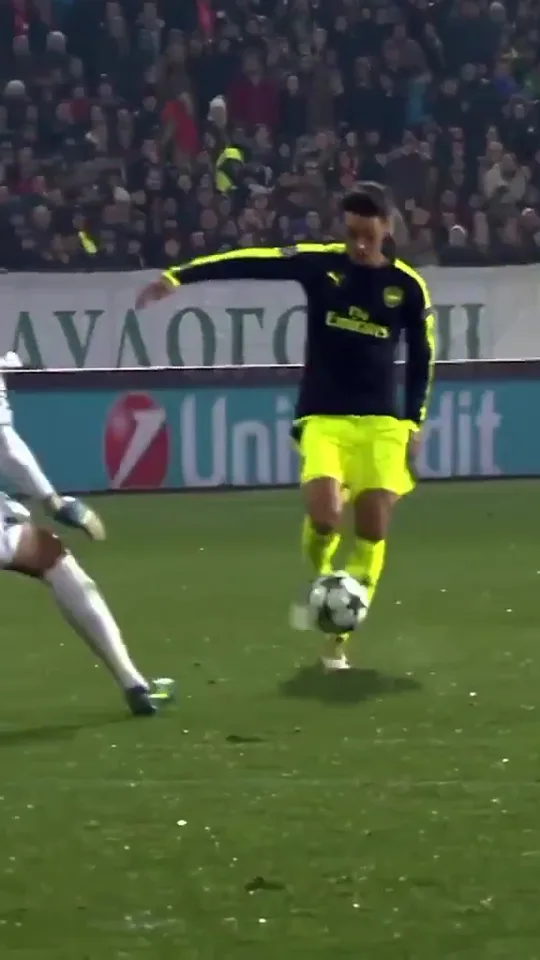
Upload a person’s photo. Replace Özil. The original goal video is ready as your reference.
Original Özil video includedYour photo replaces Özil. Clico prepares this reference and its original sound.Watch original
What is the Özil goal AI trend?
It starts with Özil’s chip over the goalkeeper, the defenders’ last challenge and the finish. A new person steps into that familiar play. Watch the original goal and one replacement example made in Clico.
The original goal→Made with one photo
Your look. The play. The sound.
One person, a familiar goal and a soundtrack come together.
The photo used in the Clico example.
Bring the person you want to see.
The yellow beanie, orange vest and everyday clothes carry from this photo into the goal video. Choose a photo that shows the face and outfit you want on the pitch.
One person, with their face clearly visible.
A full-body photo that includes clothes and shoes.
JPG, PNG or WebP, up to 8 MB.
Follow the chip, the run and the finish.
The original clip supplies the play: the goalkeeper rushing out, the defenders’ challenge and the final shot. Your photo supplies the new scorer.
Jump to a moment to inspect the reference. Clico supplies the complete reference when you send your photo.
The audio from the finished example.
Bring the sound into the finish.
This Clico example combines the replacement video with its reference soundtrack. Listen here, then play the complete result with sound.
For your version, the fixed export uses the original goal clip’s soundtrack. Check the timing and volume in the finished file before sharing.
How to make your Özil goal AI video.
Bring one photo. The original goal reference is already prepared. To direct a different scene, use Clico’s AI video generator.
Original Özil video includedYour photo replaces Özil. Clico prepares this reference and its original sound.Watch original
Choose Özil’s replacement
Upload one clear photo of the person you want to see. Include their face, outfit and shoes. You can add or change the photo here or at the top of the page.
Review and send your draft
Select Continue in Clico. Your photo opens with the fixed goal template. Clico prepares the reference and original soundtrack. Sign in if needed, then review and send the request in Clico.
Review and download
When the result is ready, check the face, every ball touch and the finish. Review the full clip with sound, then download the finished MP4.
Before you take the shot.
What is the Özil goal AI video trend?
+
It puts an unexpected scorer into the famous goal sequence: a chip over the goalkeeper, two defenders trying to stop the run and a calm finish. The joke is the new person and their everyday outfit, while the familiar football action stays recognizable.
Can I replace Özil with another person?
+
Yes. Upload a clear photo of the person you want in the clip. This page prepares your photo and a fixed goal template. Clico supplies the original reference and applies the preset model, directions and original-sound export. Review and send the draft to begin.
What photo should I upload?
+
Use one clear photo of one person, preferably full body with their face, clothes and shoes visible. Avoid a group photo, covered face or heavy blur. JPG, PNG and WebP up to 8 MB are accepted.
Will only the scorer change?
+
That is the requested edit. Your photo defines the scorer, and the video defines the goalkeeper, defenders, ball and scene. The template fixes the original reference, model and replacement directions. Identity, ball contact and background preservation can vary, so review the full result before sharing.
Do I need to write a prompt or find the reference?
+
The goal reference and a short editing brief are prepared here. Add your photo and continue to Clico to review and send them. The goal template keeps its original reference and settings. Use a separate video request for another reference.
Will it include the sound from the reference?
+
The Clico example shown here combines its replacement video with its template’s soundtrack. You can listen to that finished audio on this page. The fixed template restores the original goal clip’s soundtrack in the final export. Review the finished file before sharing. Music from a viral post is not automatically licensed for reuse.
Is making a video free?
+
You can watch the references and prepare your photo here. Video creation uses Clico credits and requires an eligible paid plan. Continue to Clico to review the creation request; opening a draft does not start a paid generation.
Was this example made in Clico?
+
Yes. The yellow-beanie photo and finished replacement video were made in Clico. The example used the supplied grey-coat goal remix as its video reference; new drafts from this page include the original Özil clip. The original footage is shown for context, and the example illustrates the replacement idea rather than a frame-perfect copy. This is an independent Clico page with no affiliation with Mesut Özil, Arsenal, UEFA or Media.io.