Image 2.6 reviewson quality, speed and cost
GPT Image 2.6 vs 2.5, with matched prompt results, recorded timings and costs, plus a look at Nano Banana.
GPT Image 2.6 is worth a trial if you make many visual drafts, need to revise specific parts of an image, or want to explore scenes that would be difficult to photograph. Keep GPT Image 2.5 or your current Nano Banana workflow as a baseline while you do. The evidence so far supports a more useful conclusion than “upgrade”: the new model can be faster on some work, but speed and cost do not move together, and a good first image is only the beginning of a creative job.
In Clico's retained five prompt record, 2.6 Flare had a faster median response than 2.5 Flare but a higher average recorded charge. A separate test of Sunburst found 2.6 slower than 2.5 across three requests. Neither result is large enough to rank the models generally. Together, they make the case for comparing the whole job: the first image, the revisions it needs, the time spent waiting, and the actual bill.
Where 2.6 is worth a closer look
For exploratory work, an image model is useful when it makes an idea concrete enough to judge. The stained glass whale, shared as a GPT Image 2.6 example by Picsart and OpenAI, combines translucent color, light, and a convincing sense of scale. It is the sort of impossible scene a creative team can use to discuss a direction before committing to production.
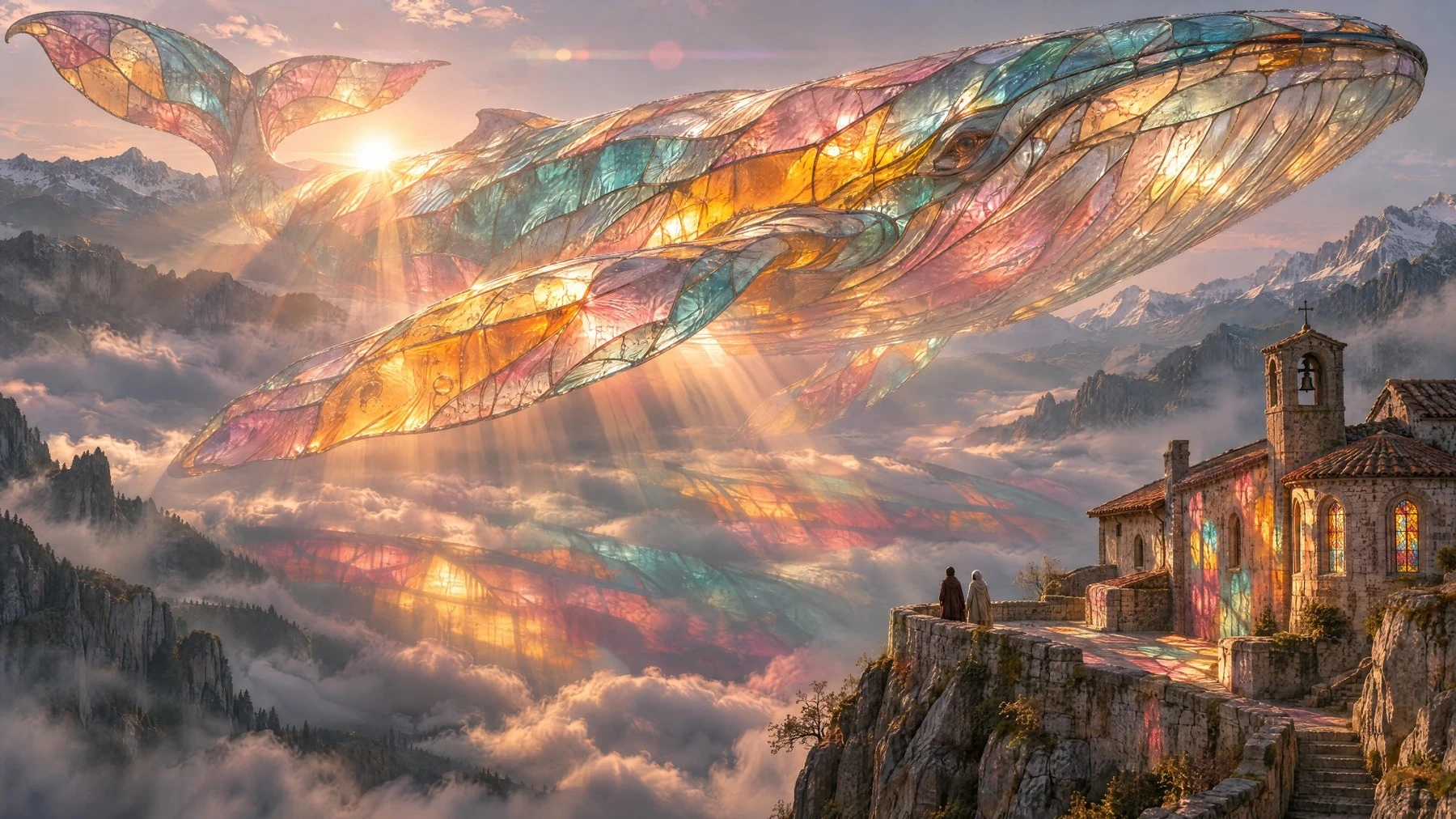
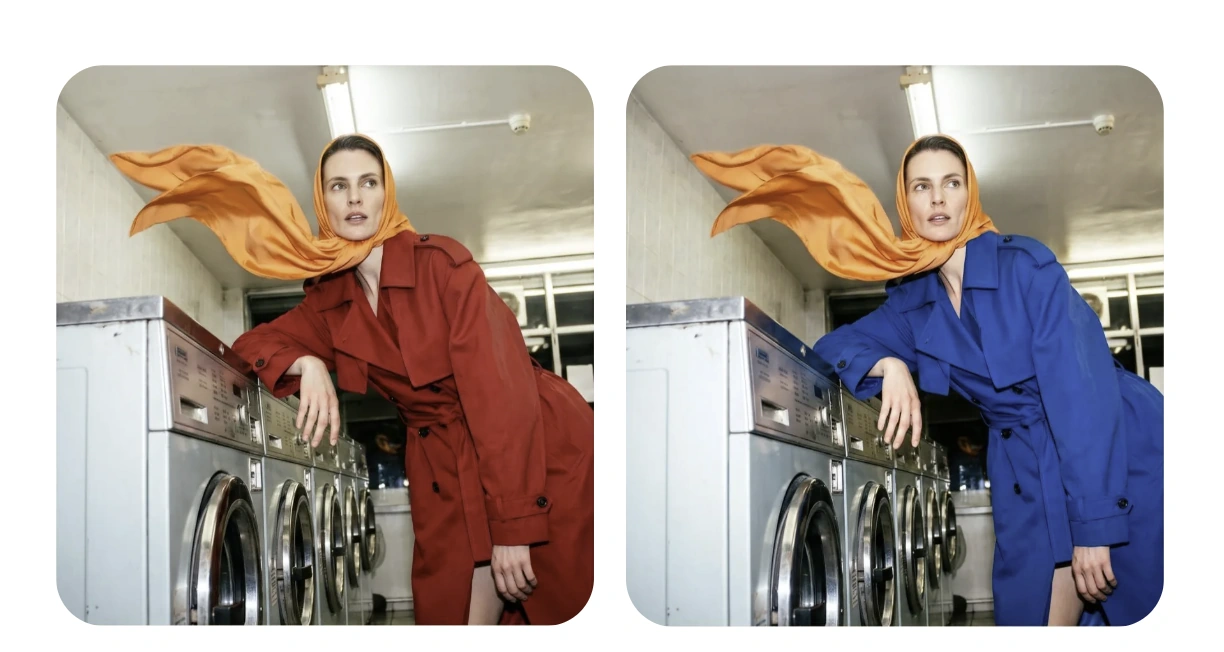
The picture answers one question well: can this direction be visualized? It does not answer whether a particular campaign can reproduce the same whale from a second angle or maintain its form through revisions. Those are separate checks. If continuity matters more than an appealing first frame, bring an existing reference and ask for a small, specific change. The cover example shows that kind of focused edit: the coat changes from red to blue while the orange scarf, pose and laundromat remain recognizable. The example is a useful inspection target, not a guarantee of identical preserved pixels.
Product imagery creates a different constraint. OpenArt's example keeps a HEARTH candle recognizable across four seasonal settings. The label and amber jar anchor the composition while the surroundings change. For a campaign, that relationship matters more than an attractive background.
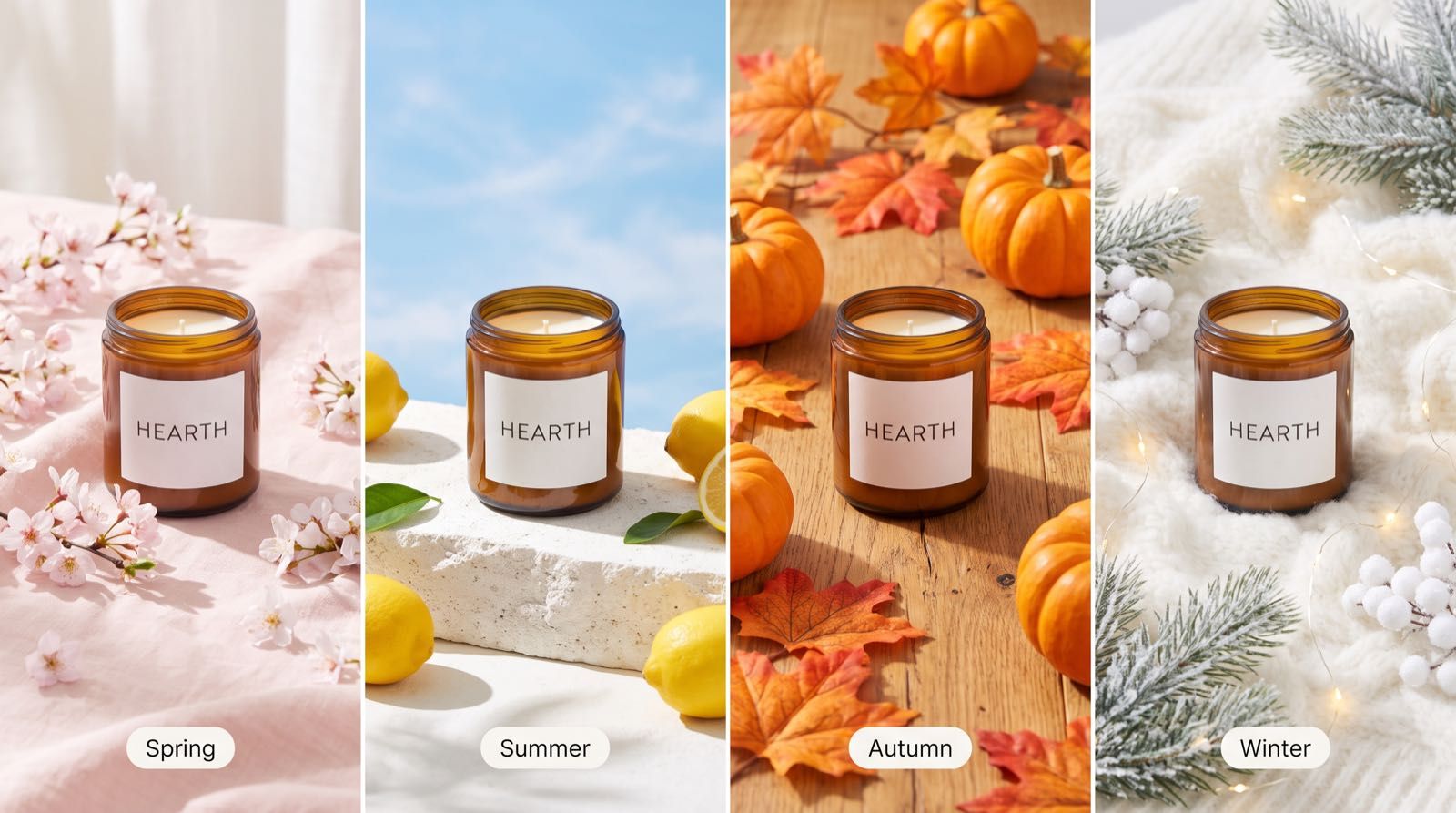
A selected example cannot establish that a model will preserve your actual packaging. For a real product, inspect the label, cap, proportions, colors, and any regulated copy against the source photograph. A background that looks better is not useful if the jar or the wording has quietly changed. Compare the time needed to correct those details with the time you already spend on the same task in 2.5.
OpenArt's kitchen scene sets a different test. Cold refrigerator light separates the foreground woman from a second figure in shadow. A red kettle punctuates the dark middle of the frame. For film and fashion concepts, those relationships should communicate the lighting and staging you intended.
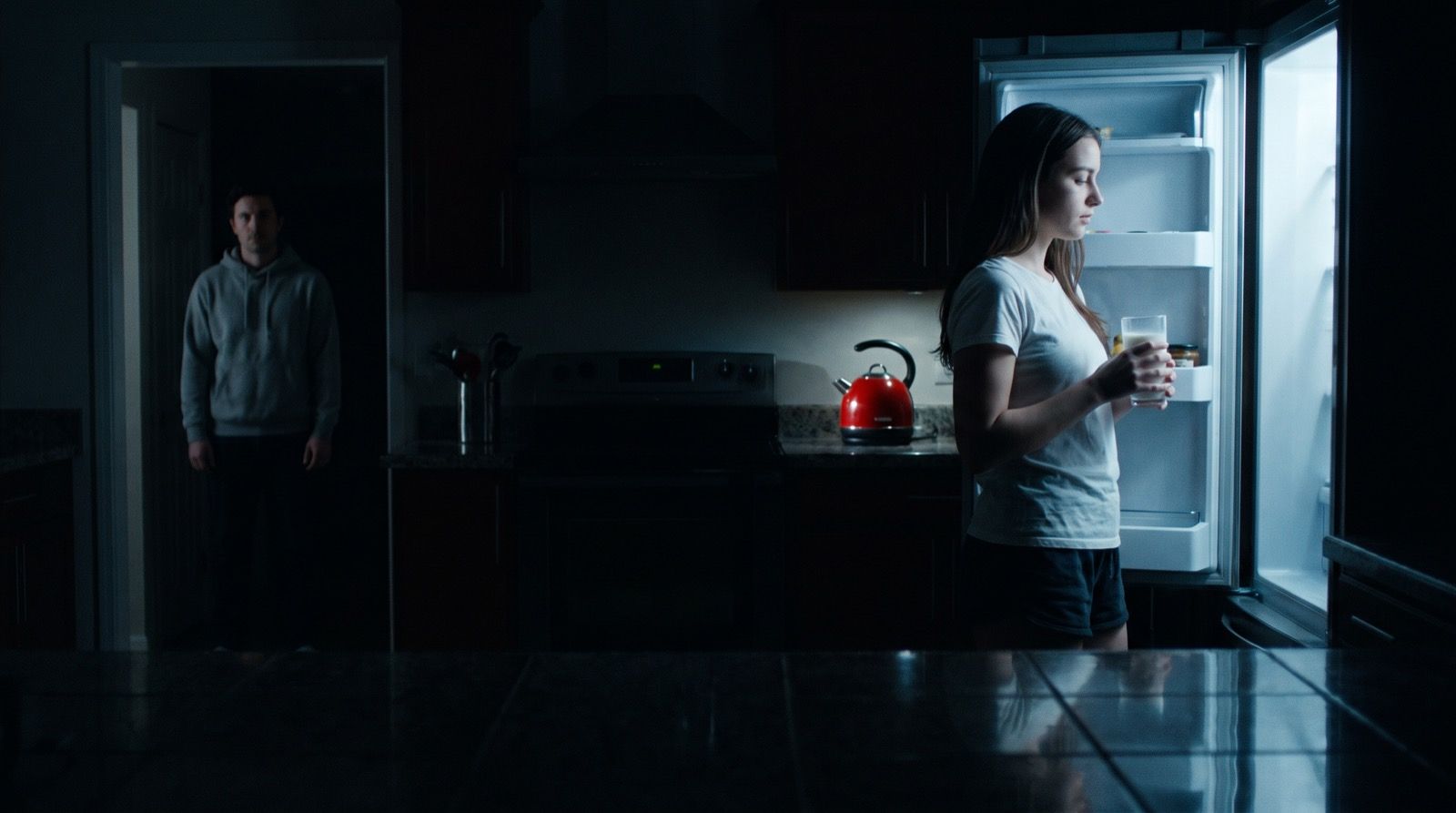
These examples are marketing selections, not Clico outputs or a trial against other models. Their value is showing what to put in your own brief. For a product campaign, the pass condition might be a faithful label in four settings. For a film concept, it might be the position of two people and a consistent light source. For a surreal image, it might be preserving a subject while changing the viewpoint. Without those conditions, it is easy to choose the most striking image and miss the work needed afterward.
GPT Image 2.6 vs 2.5
The most revealing number in the retained Clico record is not just the response time. It is the combination of time and charge. The record contains five different prompts sent once per model on November 5, 2026, through the OpenRouter Images API, with automatic quality and a requested 1024 square output.
| Model | Median elapsed time | Mean recorded charge per image |
|---|---|---|
| GPT Image 2.5 Flare | 12.557 seconds | $0.020 |
| GPT Image 2.6 Flare | 8.452 seconds | $0.064 |
| GPT Image 2.6 Sunburst | 21.820 seconds | $0.040 |
For this small set, 2.6 Flare returned sooner than 2.5 Flare, while its mean recorded charge was higher. The 2.6 Flare portrait cost $0.174125 on its own, so a single task has a noticeable effect on the average. Automatic quality was requested, but the resolved quality and complexity were not recorded. That prevents us from isolating the version as the cause of the difference. These are OpenRouter charges, not Clico retail credit prices.
The reference edit makes that tradeoff visible. Both Flare versions received the same blue bottle illustration and the same request: change only the bottle body to dark forest green, keeping the cap, cream label, shadows and layout.
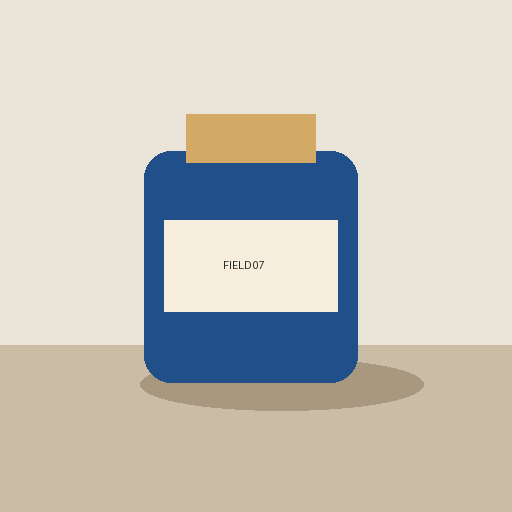
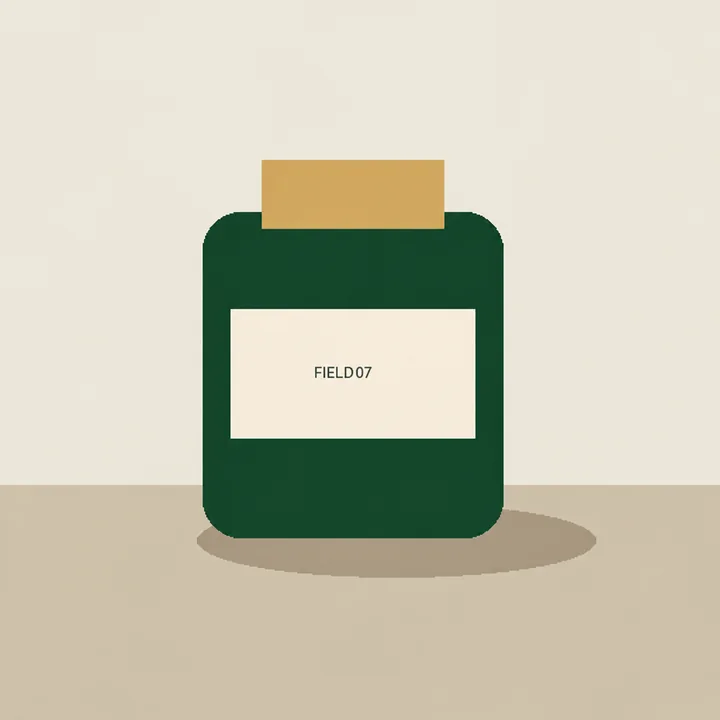
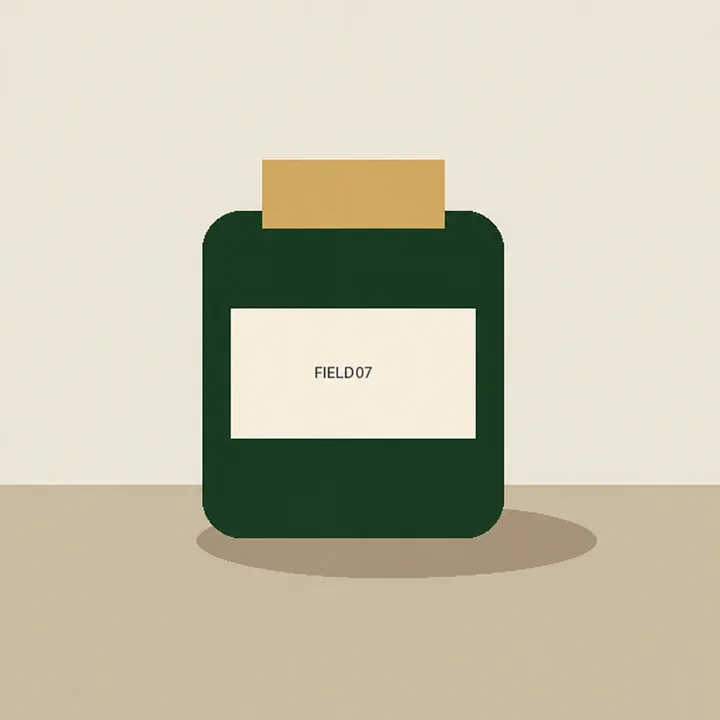
Both versions make the bottle green and keep the cap, label and broad layout recognizable. The 2.6 result uses a darker green, but there is no obvious structural improvement in this pair: 2.5 already achieves the basic recolor. The recorded 2.6 Flare request took 9.423 seconds and cost $0.033197, versus 12.557 seconds and $0.014357 for 2.5 Flare. That is a shorter wait for a higher charge, rather than a clear reason to replace 2.5 for every simple edit.
This distinction matters when a team generates many alternatives. Saving a few seconds on a draft may be worthwhile when it keeps a review moving. If each candidate costs more or needs several corrections, however, a fast first response may not reduce the cost of an approved image. Track the total for a usable result, not just one request.
Equal token prices do not settle the bill. OpenAI's standard rates match for the relevant 2.5 and 2.6 models, but token use can differ. The output calculator estimates 196 output tokens for a 1024 square low quality 2.5 image and 823 for 2.6. At high quality, both estimates are 1,756. These figures exclude input costs.
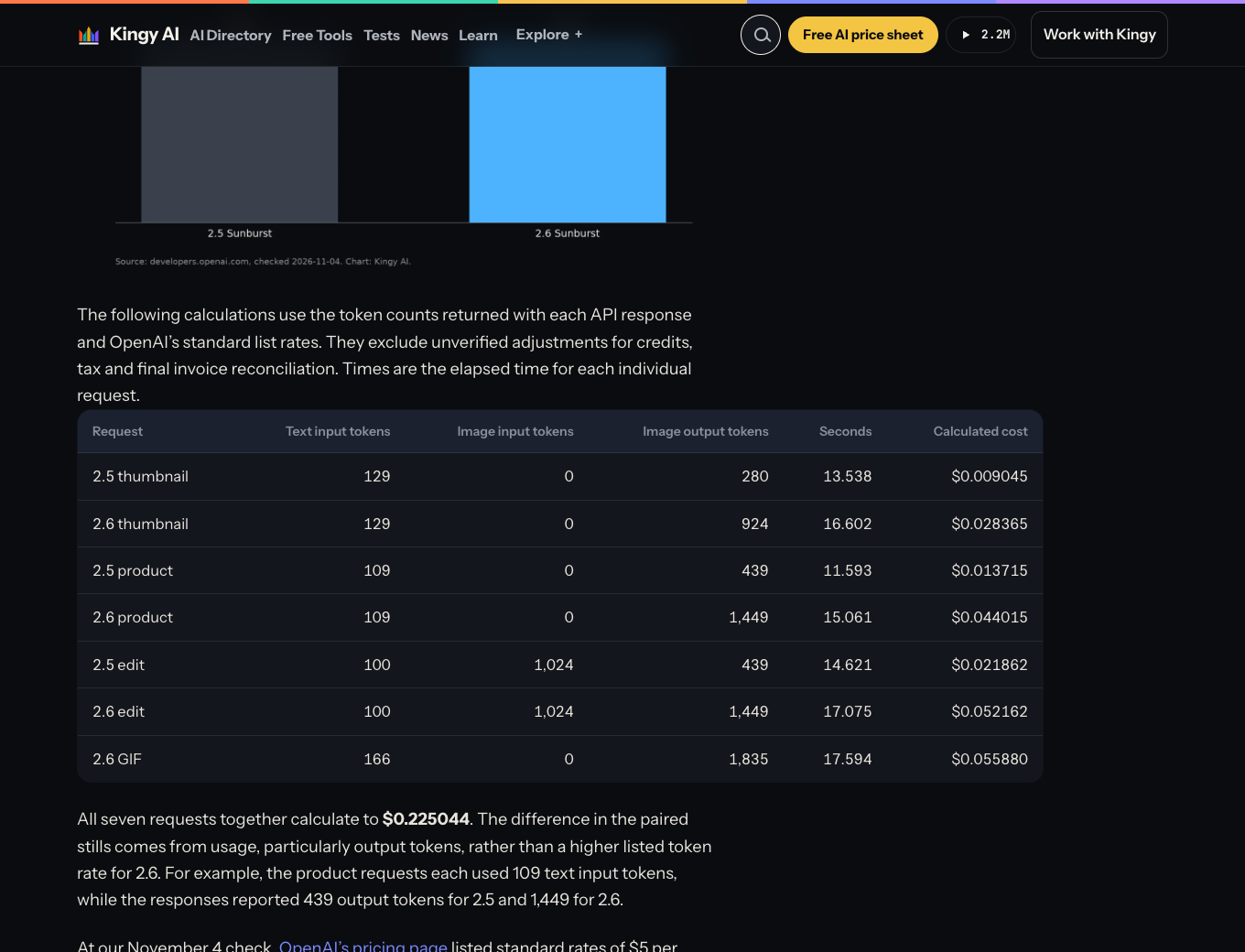
There is also a counterexample to a blanket speed claim. In Curtis Pyke's Kingy test, three first attempt still requests at medium quality took 39.752 seconds in total with 2.5 Sunburst and 48.739 seconds with 2.6 Sunburst. Usage based cost estimates totaled $0.044622 and $0.124542. These are sums from a different test, not additional rows to average with Clico's medians. Each edit used that model's preceding output as its reference. The test omitted complexity, which defaults to high for 2.6, so even matched quality does not mean every condition was equal. It shows why the answer can change with the model and settings, not that Sunburst is always slower.
Match the settings to the edit
OpenAI positions Flare for quick iteration and Sunburst for more demanding detail, layout, and edits in its model guidance. That is a sensible starting point for a trial, not a rule that every Sunburst image will be preferable. A simple background change may benefit more from preserving the product than from adding detail elsewhere.
The OpenAI Image API guide separates quality from complexity. Quality concerns rendering; complexity controls how much planning the model uses. When complexity is omitted, it defaults to high. OpenAI notes that more planning can increase latency and introduce unwanted changes. For a focused edit, compare a lower complexity setting where your provider exposes it, then inspect the parts you asked to keep. For a crowded layout, a higher setting may be worth trying. The result, not the setting name, decides whether the revision is usable.
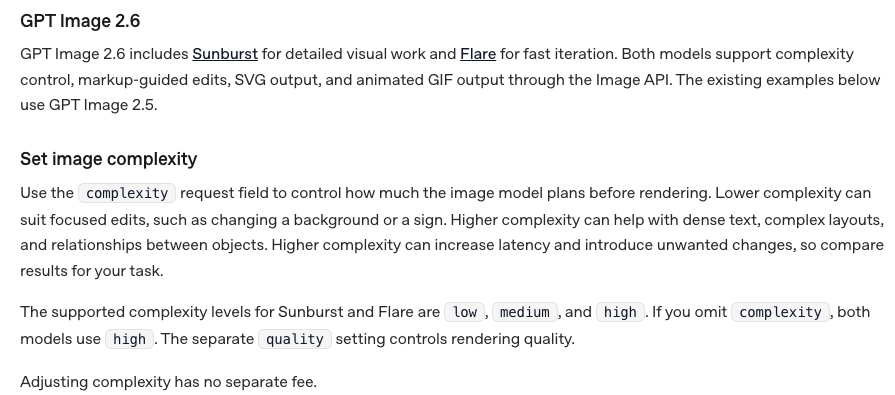
The API also offers SVG and GIF output through generation requests. Those formats matter if you need an editable graphic or a short animation, but the edits endpoint does not output SVG or GIF. Do not assume that a format option in the API appears in every image application.
Should Nano Banana users switch?
If Nano Banana already delivers your approved work, start with the exact version you use. Google calls its newer model Nano Banana 2.1, API ID gemini-nano-banana-2.1; Nano Banana 2 is gemini-3.1-flash-image, and Nano Banana Pro is gemini-3-pro-image. They are distinct models, and a comparison that simply says “Nano Banana” can hide the choice you actually face.
Google's image generation guide documents 1K, 2K, and 4K output and conversational editing for 2.1. It describes up to 14 reference images in supported Gemini API workflows, including object and character references. Individual applications can set lower limits. For a campaign assembled from several references or delivered at large resolution, those are practical reasons to keep 2.1 in the comparison. For a workflow that needs SVG or GIF generation through OpenAI's API, 2.6 adds a different reason to test.
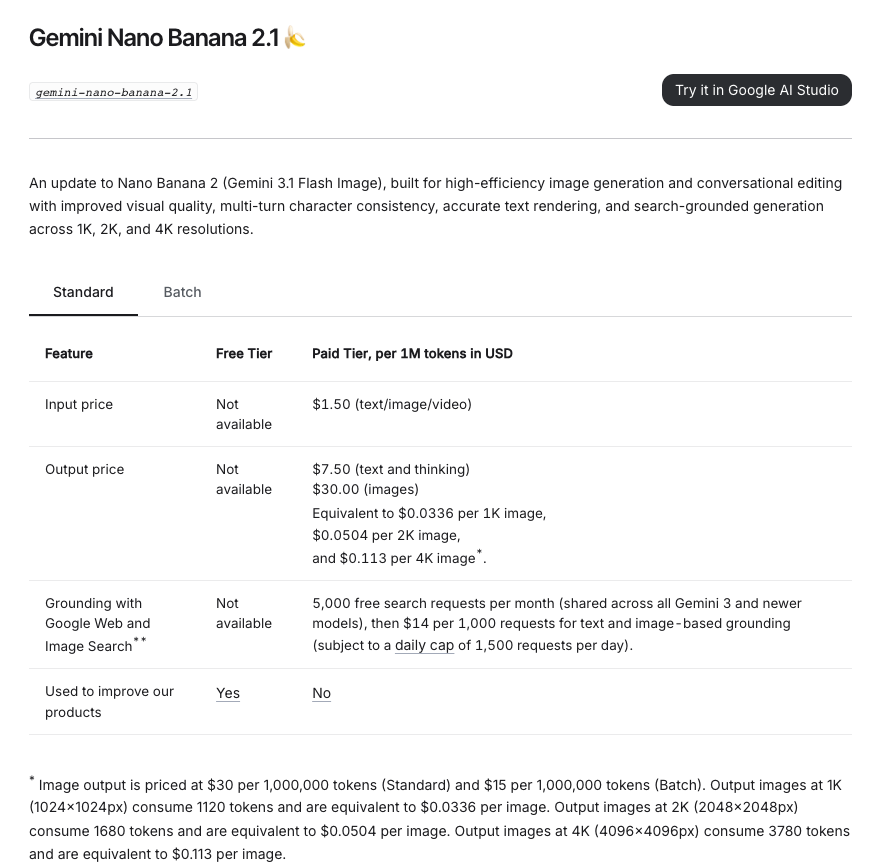
Cost needs the same care as capability. As of November 5, Google's standard Gemini API pricing estimates Nano Banana 2.1 image output at $0.0336 for 1K, $0.0504 for 2K, and $0.113 for 4K. Input, text or thinking, and applicable search charges can add to that. These output estimates cannot be ranked against the total OpenRouter charges in the earlier table as if they cover the same costs. Neither is a Clico retail credit price.
There are no Nano Banana results in Clico's retained set, so it cannot establish a speed or quality winner against 2.6. A fair switch decision starts with the same brief and reference assets, uses the settings you would actually pay for, and checks both the finished image and the revisions. Keep the incumbent if it meets the brief at a better total cost or with fewer corrections.
Check the result you actually need to deliver
Early creator examples can suggest what to inspect without settling the decision. In a November 4 post on X, Angel shared an owl animation preview, a food image, and a pixel style crab, reporting improved noise but continued difficulty with pixel art. The post does not disclose the exact prompt, variant, or quality. It is one creator's assessment, not a failure rate or proof of a general improvement.
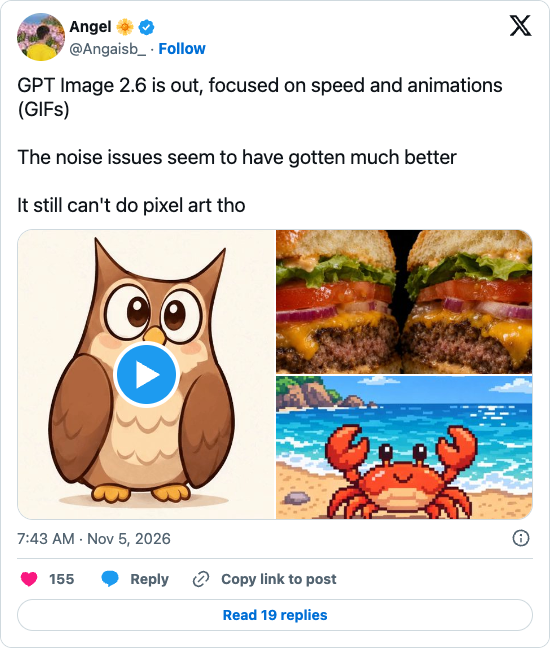
A still preview cannot show whether a loop joins smoothly. Kingy's assessment of its own native 2.6 GIF reported a visible seam and uneven movement. If animation is your reason to switch, play the actual file and inspect the join. If you need pixel art, examine edges at the intended display size. If you need a product ad, compare the lettering and packaging with the source. Each check follows from the deliverable, not from the model announcement.
Choose one existing brief and save the result you would otherwise use. Try 2.6 Flare for iteration, or Sunburst for a demanding layout or edit, then repeat enough times to see whether the result is consistent. Record waiting time, actual provider charges, and the revisions needed to reach approval. Switch where that complete process improves your work; retain the old model where it does not.