
Ausar vs. Clico for ViralVideo Templates
An evidence based Ausar review and Clico alternative comparison covering viral templates, motion control, credits, pricing, and workflow.
You’ve seen the trend. Now you want your best friend (or your dog) in it.
Ausar and Clico can both get you there. Both are multi-model studios with prepared viral templates, motion and reference controls, object replacement, and a credit balance, all in one workspace. So a feature checklist won’t settle this one.
What settles it is what happens after the first preview. Do you regenerate the whole clip, make a small fix, or give up and try another trend?
Full disclosure: this is the Clico blog, and we build Clico. We won’t pretend this is a neutral review. But we’ll show our sources, tell you where Ausar is the better pick, and point out where our own product still falls short.
Here’s the short version:
- Choose Ausar if a specific model or motion workflow is the reason you’re opening the app.
- Choose Clico if you want to start from a trend and then keep working on the same video: ask what went wrong, compare the result with what you had in mind, and apply a small edit without regenerating the whole clip. You also get current video, image, chat, and 3D model routes, plus a template catalog that goes well beyond memes. And because Clico sells a one-time credit pack, an occasional experiment doesn’t have to start with a subscription.
How we compared them We used dated public pages, Clico product evidence, pricing screenshots supplied for this review, outputs from three Clico templates, and published Ausar walkthroughs. We compared the work each product helps you finish. We didn’t treat a longer model list, a bigger catalog, or a credit number as a quality score. All pages and prices were checked on November 20, 2026. Catalogs, models, promotions, and account access can change.
Ausar vs. Clico at a glance
Start with the job you actually need done, not the product. Here’s where we’d start for the most common ones, and what to check before you spend a credit.
| If your next task is… | Start with | Check this before you pay |
|---|---|---|
| Recreate a prepared trend from photos | Clico or Ausar Templates | Required roles, reference inputs, soundtrack, duration, and the current quote |
| Pick a model or transfer movement from a reference | Clico or Ausar | Whether that model, motion route, and input type are enabled for your account |
| Replace an object or person in a prepared scene | Clico or Ausar | Which elements the recipe keeps and which it regenerates |
| Figure out why an existing clip misses the brief | Clico’s video editing workflow | Whether the selected model can read the video, and whether the problem is visible in the project |
| Add captions, move them to the top or bottom, or adjust a cut | Clico’s video editor | The preview after the edit, the aspect ratio, and the final export |
| Try one or two short templates | Clico’s one-time credits | The exact quote, and how much balance is left after the first result you keep |
| Run a controlled quality comparison | Either, with identical inputs | Every attempt, every setting, the actual charge, and the full exported video |
Both are multi-model studios
Ausar and Clico both give you more than one way to reach a finished video, so “Ausar is the broad studio, Clico is the template catalog” doesn’t hold up.
- Ausar groups video models, image tools, audio tools, Motion Control, object replacement, chat, and prepared templates in one account.
- Clico brings its own video and image model routes, reference inputs, motion and object workflows, prepared viral templates, chat, and a native video editor into one account.
In both, the route you pick changes the inputs, the estimate, and how carefully you need to review the result.
The real difference shows up once generation is done. Ausar is especially appealing when you already know which model or motion route you want. Clico is especially appealing when you want to start from a trend, then stay in one workspace while you inspect and finish the result.
Where Ausar shines
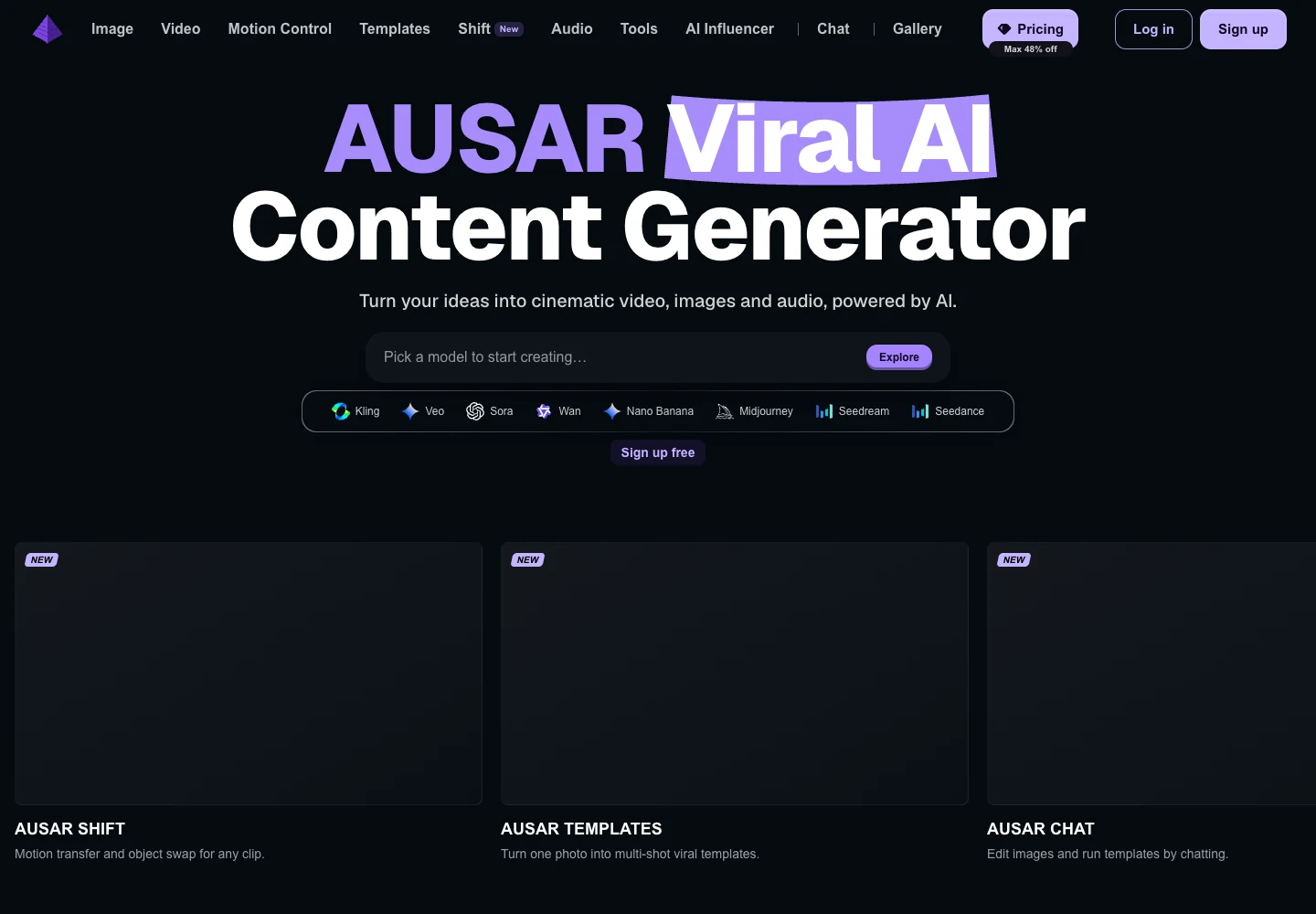
Ausar’s biggest strength is breadth: several creation routes sit right next to each other.
You can start from a prepared template, pick a video model, transfer movement from a reference, prepare an image, use an audio tool, or try object replacement—without switching accounts. That’s useful when the scene in your head matters more than any specific catalog card.
The template workflow itself is straightforward. Pick a template, check whether it needs one photo or several references, review the settings, read the estimate, and submit.
The tradeoff? More decisions. The model, resolution, duration, reference, and number of retries all affect what it costs to get a result you’re happy with.
Where Clico shines
Clico has two advantages for this job: a bigger prepared catalog, and an editor that lets you keep working on a clip after it’s generated.
A larger catalog, organized by scene
Clico’s public viral video template catalog is organized around finished scenes. You can see the performance, the frame, and the labeled photo roles before you prepare a single file.
At the time of writing, the public index lists mid-forties templates; the Ausar snapshot above listed 30 cards. Those counts will change, but the gap matters when you already know the trend you want by name.
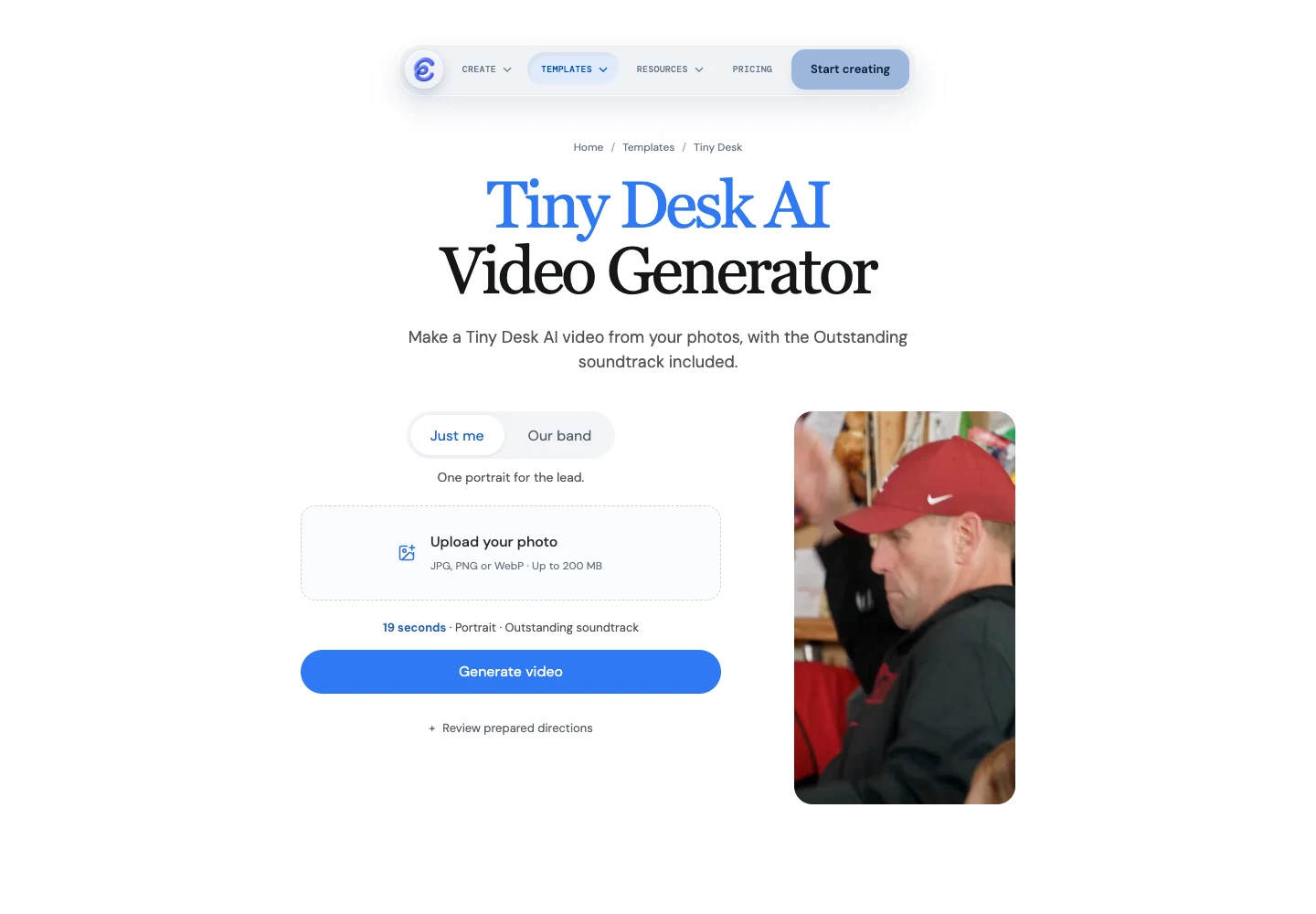
The catalog includes Birds of a Feather, Bulin 47, No Scrubs, Tiny Desk, and other performance, sports, film, and music references. Pick a role, upload the matching photo, review the request, and watch the result. No filming the dance yourself, no long prompt.

Templates are only one way in, though. Clico’s AI Video Generator accepts model-specific video routes, reference media, aspect ratio, resolution, duration, and audio settings.
An edit loop after generation
If you’ve made AI videos before, you know they can miss the brief in pretty ordinary ways:
- The subject walks out of frame.
- A crop hides the action.
- A face drifts during a turn.
- The caption covers the key movement.
- A caption at the top needs to move to the bottom for the final post.
None of these should require a brand-new generation. Clico’s AI Video Editor gives you a second option. When the selected model supports video input, Clico can look at your clip alongside your request and the current edit project. You ask about what looks off, then apply a structured change instead of starting over.
The editor keeps clips, scenes, captions, audio, framing, and the output aspect ratio as one editable project. You can:
- Change caption text and font size, move captions to the top or bottom, or remove them
- Select, split, trim, and rearrange clips on the timeline
- Preview every change before you export
This is where the economics change. A caption or layout tweak updates the project; it doesn’t regenerate every frame. So it can use very little generation compared with making a new clip. The exact charge still depends on the operation and your account, but a small fix doesn’t have to eat a full video budget.
Here are outputs from three Clico templates. Watch each one all the way through, then ask yourself: does this need another generation, or just a small edit?
Bulin 47 output from a Clico template. Watch the face, hands, timing, and sound through the full clip.
Tiny Desk output from a Clico template. The prepared performance and soundtrack come with the template.
No Scrubs output from a Clico template. Even a good result needs a full playback check before you post it.
How each product handles the same task
Here’s the same job, step by step, in each product.
| Step | Clico | Ausar |
|---|---|---|
| Start from a prepared trend | Choose a template, assign the visible roles, review the request | Choose a template, add the required photos or references, review the request |
| Choose a model | Use the model route offered for the task, with its settings and input types | Select from the models offered for the task and its settings |
| Transfer movement | Use a supported reference and Clico’s motion route | Use Motion Control with a reference video, when available |
| Replace a person or object | Use the supported object workflow or a prepared recipe | Use object replacement or a prepared recipe |
| Inspect an existing clip | Ask the video workflow to inspect the clip, when the model supports video input | Review the result in History and continue through an available studio route |
| Make a small edit | Change clips, captions, position, framing, audio, or aspect ratio in the native editor, then preview | Use whatever route is available for that asset and task |
| Compare credits | Read the configured quote. Not every card in Clico’s public catalog shows a stable estimate yet | Read the plan and workflow estimate. Ausar’s credits are its own unit |
| Use it occasionally | Buy 1,000 credits once for $9.90, valid 12 months, no auto-renewal | Lite starts at a $9 monthly equivalent for 100 credits a month, billed $108 annually. The calculator’s typical run (~65 credits) leaves too little for a second similar video |
| Review the final file | Watch the full export: identity, hands, framing, timing, captions, sound | Watch the full export: identity, hands, framing, timing, backgrounds, sound |
This table isn’t about picking a winner. A model picker only proves a route is listed. A preview only proves one request returned a video. Neither tells you whether the final export will meet your brief.
Pricing: what a 14–15 second template actually costs
Short answer: Clico is easier to try because its first paid option is a one-time pack. Whether it’s cheaper per finished video needs a controlled test, because the two credit systems aren’t interchangeable.
Clico pricing
| Plan | Price | Credits |
|---|---|---|
| Free | $0 | 100 credits/month for eligible work (doesn’t unlock every video operation) |
| One-time pack | $9.90 once | 1,000 credits, valid 12 months, no auto-renewal |
| Pro | $19.90/month, or $192 billed annually | 2,000 credits/month |
| Max | $49.90/month, or $480 billed annually | 5,000 credits/month |
To be clear: the pack is a single $9.90 purchase, not a $9/month subscription. Annual plans charge upfront, while the credits are issued monthly.
Paid credits are shared across Clico Web, the Chrome Extension, and Desktop for Mac, and eligible chat, image, and video work all draws from the same balance. So whatever’s left after a template can go toward another template, an image, or an eligible Clico conversation.
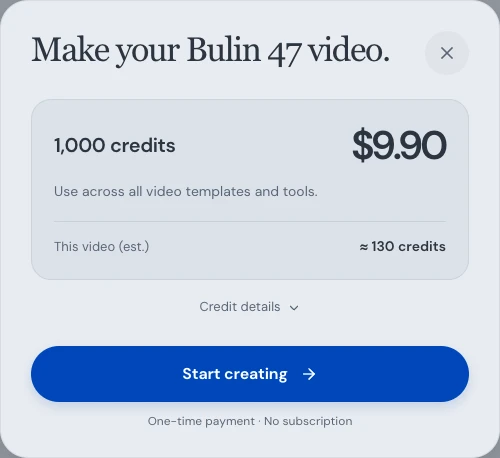
For the common 14–15 second templates (Bulin 47, No Scrubs, Tiny Desk), a first attempt usually leaves room in the $9.90 pack for another idea. Bulin 47 gives a concrete example: about 130 credits. No Scrubs and Tiny Desk can cost more or less depending on the model, resolution, references, audio, and duration, so trust the quote you see before you submit.
That leftover balance is the point. One short template you’re happy with won’t normally drain the pack. A second take still costs credits, of course, and longer or higher-resolution requests cost more.
Ausar pricing
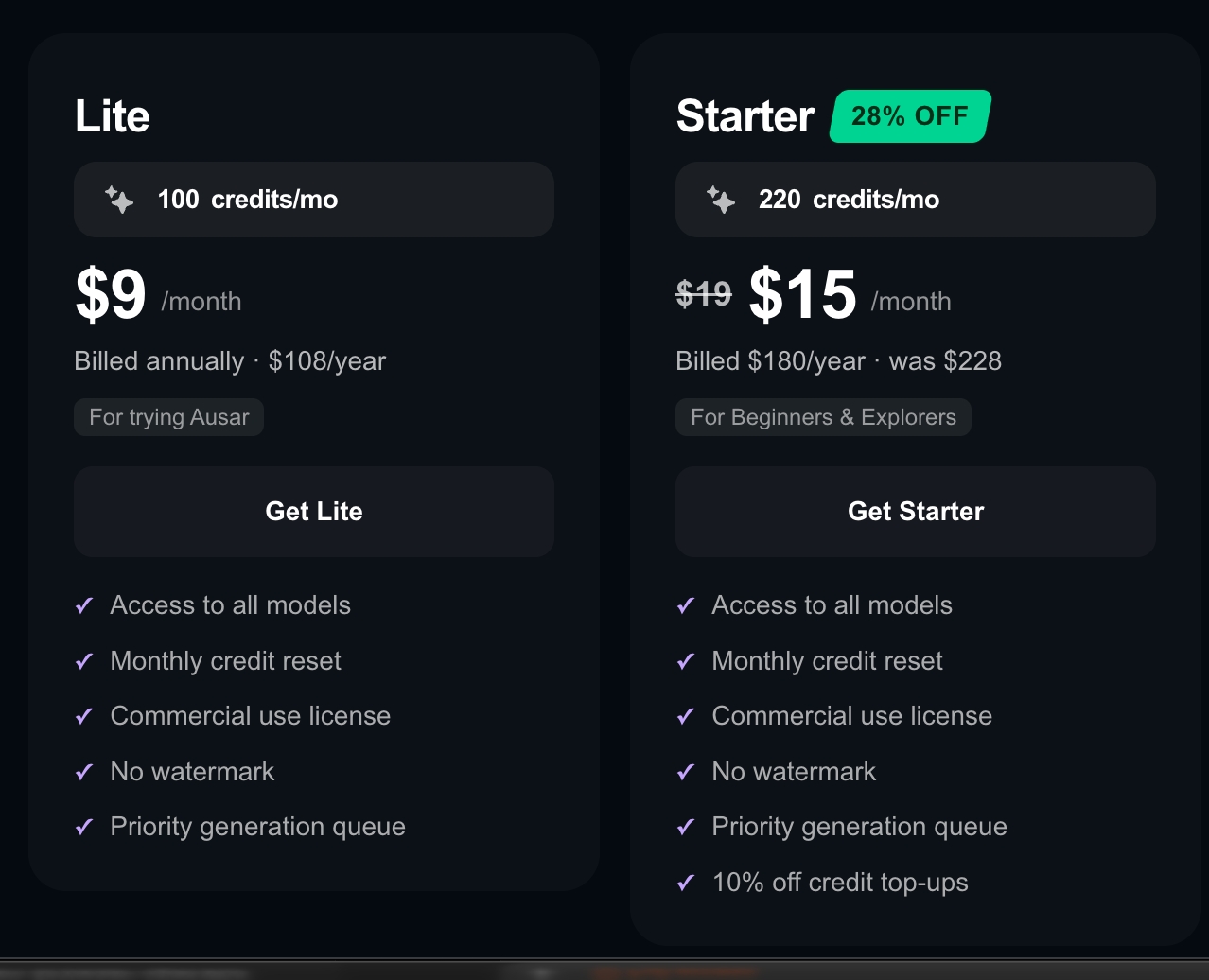
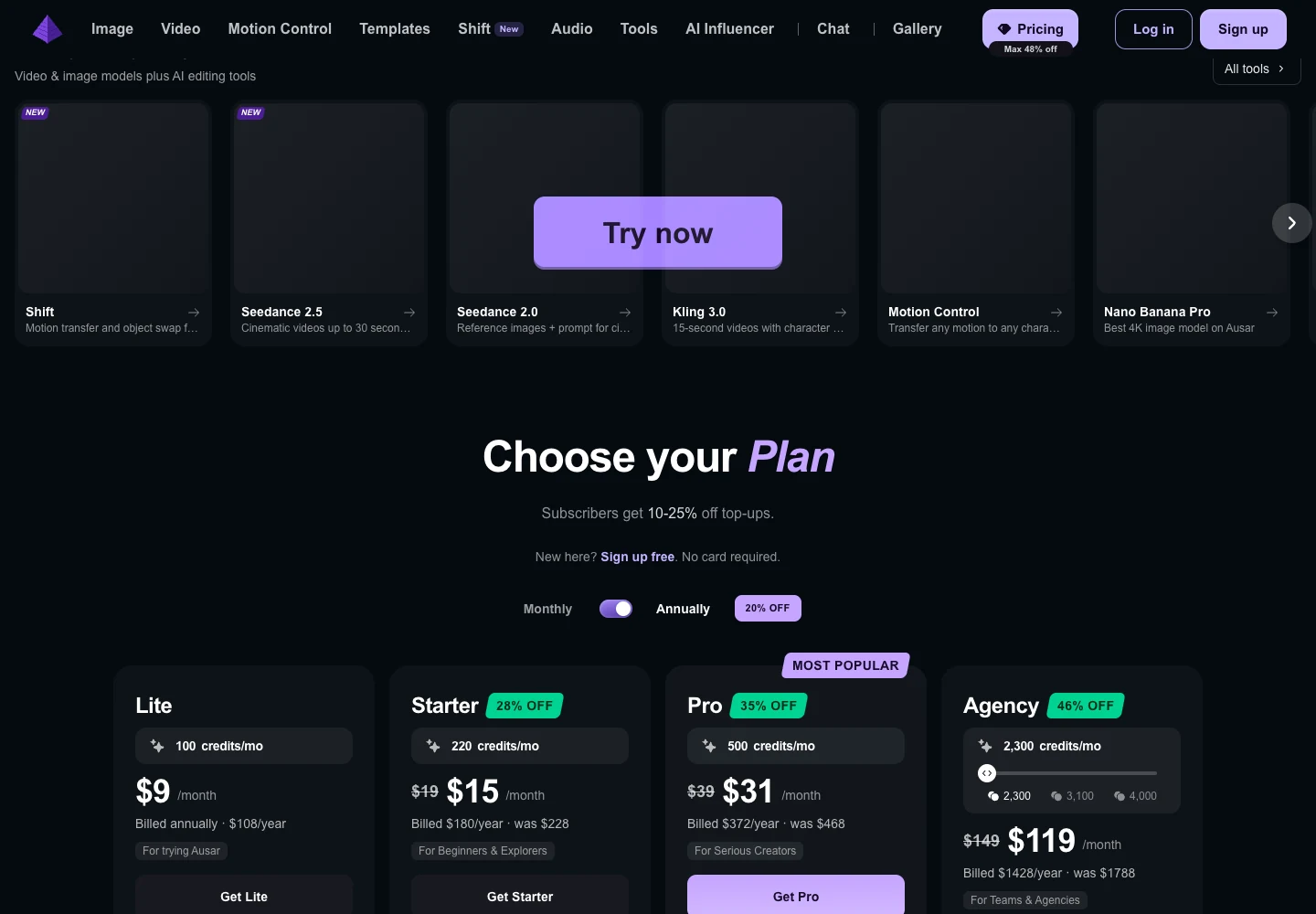
Ausar’s annual USD pricing view supplied for this review looks like this:
| Ausar plan | Credits | Price shown | What a typical ~65-credit run means |
|---|---|---|---|
| Lite | 100/month | $9 monthly equivalent, $108 billed annually | One typical generation, with ~35 credits left. A second similar video needs more credits |
| Starter | 220/month | $15 monthly equivalent, $180 billed annually | About three typical generations, before retries or higher settings |
In practice, Lite covers one typical template video. It doesn’t reliably cover a second, and a single retry can use most of what’s left.
And “typical” is doing a lot of work there. One configured request we saw was quoted at 253 credits—more than Lite’s entire monthly allowance. So treat the plan estimate as a budgeting guide, not a fixed video count.
Also note: Ausar defines its own credits, so you can’t convert them into Clico videos by dividing one number by the other.

So which is cheaper?
Ask three questions:
- How much do you have to commit before you know the workflow fits?
- What does one configured request cost?
- How much balance is left after a result you keep?
On the first question, Clico’s one-time pack wins. On cost per identical finished video, you’d need to run both with matching settings to know.
Want to dig in? Compare current Clico pricing and the controls in the AI Video Generator. If your project isn’t tied to a prepared trend, our Best AI Video Generators guide covers the wider field.
What third-party reviews say
Public reviews are most useful when they document a real page, a visible estimate, or a repeatable workflow. Here’s what they add.
- Filmora’s Ausar review says Ausar works better with clear prompts and reference images than with complex scenes. It praises the creative variety but warns that some templates may take several attempts. That fits our read: Ausar gives you more routes to try, and your real cost depends on how many attempts it takes to get a clip you keep.
- An AIWizard walkthrough of the Hotel Lobby template shows a two-photo recipe, three resolution options, a visible 52-credit run, a prompt viewer, and a History pipeline. It also notes that identical inputs can produce different results. Helpful for understanding one template, but it’s not a universal Ausar price, and it says nothing about Clico.
- A separate public review separates annual from monthly billing and recommends budgeting for attempts, not just finished clips. That’s good advice for both products. A listed model only proves the option exists in the interface—not that your account can use it, that the provider will return the same result, or that one try will be enough.
Safety and legitimacy coverage raises one more point worth repeating: get consent before uploading anyone else’s face, video, voice, or likeness, and make sure you have rights to any reference audio or footage. A viral template doesn’t change that.
When to choose Clico
You already know the trend
Clico lets you browse by the scene you want to recreate. You can see the role count and preview before you prepare any files, so you know right away whether the joke needs one person, a pair, or a whole group.
For example, our Tiny Desk AI video guide shows the difference between one lead and five band roles, and the Bulin 47 AI trend guide walks through a one-photo freestyle.
You want to keep editing after generation
If the first result has a framing problem, a missing caption, an awkward cut, or just doesn’t match what you pictured, Clico gives you an editable project to keep working on. Ask about the issue, change the relevant setting, preview it, and export when it looks right.
That’s a very different loop from burning another full generation on a small finishing fix.
You want a low-commitment first test
The one-time pack suits creators who want to try one trend or a handful of short templates. If you create every week, Pro or Max probably makes more sense: the balance refreshes monthly and covers other eligible Clico work too. Either way, check the quote before you submit.
You want a prepared performance with visible roles
Prepared scenes save you work up front. You don’t have to describe the camera move or soundtrack in a prompt.
The tradeoff is the same on both platforms, though: a prepared scene can’t give you timing, cast arrangement, or a location that isn’t in the recipe. If the original performance matters more than the trend name, use a reference-based route instead.
When to choose Ausar
Ausar makes sense when a specific model, motion reference, or object workflow is the reason you’re opening the app. Because so many creation routes sit side by side, you can go from a prepared recipe to a custom shot or a motion transfer without switching tools.
That breadth comes with more decisions. Check the model, input type, duration, resolution, quote, and retry cost before you submit. A wide studio is great when you know which route you need. It’s less helpful when you just want to find a trend, add a face, and see if it works.
How to run your own fair test
Don’t take our word for it (we’re biased, remember?). Here’s how to compare them yourself:
- Use the same inputs. Same permitted photo or reference set in both products.
- Match the settings. Same aspect ratio, duration, audio treatment, and output quality, where the controls allow it.
- Log the quote before every attempt.
- Count your retries.
- Watch the full export, ending included. Check identity, hands, framing, timing, captions, background continuity, and sound.
- Write down your next move if the result misses the brief.
That last step is the one most comparisons skip. A new generation, a motion change, an object replacement, a caption edit, and a crop adjustment all cost different amounts and give you different levels of control. What you do after the preview is where the two products really differ.
FAQs
Is Clico only a template tool?
No. Templates are one way in. Clico also offers multiple video and image model routes, motion and object workflows, chat, and a native video editor. The catalog is handy when the performance you want is already prepared; the editor and model routes matter when you need to inspect or change a clip you already have.
Can Clico edit an existing video?
Yes, when the selected workflow supports the media you supply. Clico keeps a video edit as a structured project with clips, scenes, captions, audio, framing, and output aspect ratio. You can split or trim clips, rearrange the timeline, change caption text and size, move captions to the top or bottom, and preview before exporting.
Does a small edit cost as much as a new video?
It doesn’t have to. A caption, layout, or timeline change can update the project without regenerating the source video, so the model request can be very small compared with a new clip. The exact charge depends on the operation and your account, so check the request before applying it.
Is Clico cheaper than Ausar?
Clico is easier to try occasionally, since the $9.90 pack is a one-time purchase with 1,000 credits and 12-month validity. Ausar’s pricing views supplied for this review are subscription-based. Because the credit units differ, saying which one produces a cheaper finished video requires running the same task, settings, and retries on both.
Will my first 14–15 second template use up the whole Clico pack?
Usually not, for common templates like Bulin 47, No Scrubs, and Tiny Desk. The Bulin 47 dialog estimates about 130 credits, which leaves room in the 1,000-credit pack for another idea. The exact quote changes with the model, duration, resolution, references, and any finishing work.
Do Ausar and Clico use the same credits?
No. Each defines its own unit and pricing. Compare the configured quote and the number of videos you actually keep, rather than dividing one balance by the other.
Can I upload someone else’s face?
Only with their permission, and only if you have the rights to any reference footage or audio. Think about consent and commercial use before you submit a likeness-based template.
Final thoughts
Ausar and Clico are both multi-model studios with prepared viral recipes, motion controls, object workflows, and more than one way to reach a finished video.
Ausar’s strongest case is breadth, when you already know the model or motion workflow you want.
Clico’s strongest case is the full loop around a prepared trend. The catalog is bigger in the current snapshot, roles are easy to inspect, and the one-time pack makes a short experiment cheap to start. And if the first preview misses, Clico can inspect your clip (when the model supports it), compare it with what you asked for, and apply edits like captions, top or bottom placement, cuts, framing, and audio—without regenerating every frame.
One thing we still need to fix: not every template card shows a current credit estimate yet. Until it does, we’re not going to make bigger claims about cost per video.
Our advice? Open the trend you actually want, check the inputs and the quote, generate one result, and then decide whether your next move is another model run or a small edit. That’s the comparison that really matters.